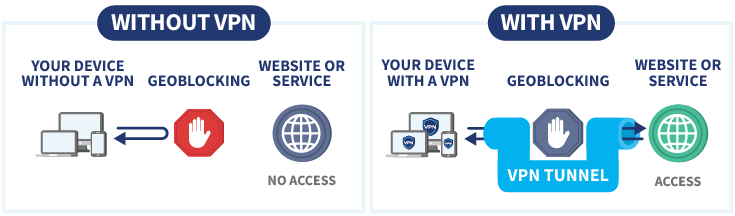
In recent years, the internet has become less free around the world. This trend is reflected not only in high-profile cases of complete internet shutdowns, but also in the systematic expansion of government control mechanisms — from restrictions on individual platforms to stricter legislation governing users and service providers. Internet censorship has become systemic, affecting both users and international platforms. This has inevitably led to increased demand for VPN services and IP addresses.
Service Interruptions and Restrictions
According to Freedom House, global internet freedom has declined for the fourteenth consecutive year. The Freedom on the Net 2024 report documents a deterioration in conditions in 27 of the 72 countries surveyed. This includes the expansion of censorship practices, increased pressure on technology companies, criminal prosecution for online speech, and manipulation of the digital information environment, particularly during election periods. Even in countries where direct bans are not imposed, mechanisms of control and surveillance continue to expand.
Another significant trend is the rise in so-called internet shutdowns — deliberate disruptions or severe restrictions on internet access imposed by authorities. The Access Now coalition reports that in 2024 alone, at least 296 such incidents were recorded across 54 countries. This represents one of the highest annual totals since systematic monitoring began in the mid-2010s. Shutdowns most commonly occur in the context of protests, elections, or armed conflicts.
At the same time, the nature of these restrictions is evolving. Whereas authorities previously often resorted to complete nationwide shutdowns, they are now increasingly employing more targeted measures. These include blocking specific social media platforms and messaging apps, throttling traffic to particular services, restricting VPN access, and imposing regional or temporary bans. Such measures are harder to detect and challenge, yet their impact on freedom of expression and access to information can be equally significant.
Overall, the trend of recent years is clear: state interference in the digital sphere is intensifying. Although the scale and forms of restrictions vary by region, aggregated international data point to a sustained global increase in internet censorship and service-blocking practices.
Growth in Demand for VPNs
Waves of new restrictions have directly correlated with surges in interest in VPN services. Users began actively searching for ways to bypass restrictions. Indirect evidence of rising demand has included intensified enforcement against VPN services: the national regulators restricted access to hundreds of circumvention tools, and dozens of VPN applications were removed from major app stores.
The world VPN market includes both international commercial VPN providers (such as NordVPN, Surfshark, ExpressVPN, and Proton VPN) and circumvention tools like Psiphon. Self-hosted solutions — which allow users to set up personal VPN servers (for example, via Amnezia) — occupy a distinct niche, as they are generally less vulnerable to the mass blocking of shared public IP addresses.
VPN providers most commonly rely on servers located in the United States, the United Kingdom, the Netherlands, Germany, France, Switzerland, Canada, the Nordic countries, Singapore, and Japan. These jurisdictions are typically chosen due to their developed infrastructure, connection quality, legal environment, and content availability.
Why VPN Growth Is Driving Demand for IP Addresses
The expansion of the VPN user base directly increases the need for large pools of public IP addresses. Each user effectively accesses the internet through a VPN provider’s IP address. When too many users share a single address, its reputation can quickly deteriorate: websites trigger captchas more frequently, financial institutions flag traffic as suspicious, and streaming platforms block overloaded IPs.
Another important factor is the continuous rotation of IP addresses in response to blocking measures. When government filters restrict known VPN subnets at scale, providers must expand their infrastructure, connect new address ranges, and distribute traffic across different data centres and autonomous systems. In this context, IP addresses become a consumable resource: some are blacklisted or lose their reputation over time, requiring constant replenishment of IP pools.
As the VPN audience grows, both server capacity and IP capacity must scale accordingly. In many cases, it is more efficient for providers to lease large IP blocks from hosting companies and address resellers than to rely solely on their own allocations. This effect becomes particularly visible during sudden spikes in demand — when a new wave of restrictions triggers mass VPN adoption, and services must rapidly increase the number of “clean” IP addresses to maintain performance and stability.
Conclusion
Widespread blocking and restrictions on internet services in various countries are fueling demand for VPN solutions. In turn, the expansion of the VPN market is increasing the need to lease and rotate substantial volumes of IP addresses. As a result, tighter internet controls are creating a chain reaction that affects not only end users but also the global IP address and infrastructure market.
As a Customer Account Manager at InterLIR, I work daily with organizations navigating the complexities of IP address management and network infrastructure evolution. The recent announcement from Amazon Web Services regarding IPv6 support for Amazon Route 53 DNS service API endpoints represents a pivotal moment in cloud infrastructure development. This enhancement, introduced on November 21, 2025, addresses a critical need that many of our clients face: preparing their network infrastructure for the inevitable transition beyond IPv4 addressing limitations.
At InterLIR, we’ve witnessed firsthand the growing challenges organizations encounter as IPv4 address availability continues to decline. Since our founding in 2020 in Berlin, we’ve specialized in helping businesses navigate the IPv4 marketplace, but we also recognize that the future of internet infrastructure lies in IPv6 adoption. AWS’s implementation of dual-stack support for Route 53 represents exactly the kind of forward-thinking infrastructure development that organizations need to bridge the gap between today’s IPv4-dependent systems and tomorrow’s IPv6-native networks.
Understanding the Strategic Importance of DNS IPv6 Support
Domain Name System services represent the fundamental translation layer of the internet, converting human-readable domain names into machine-readable IP addresses. When we discuss DNS infrastructure with clients at InterLIR, we emphasize that DNS isn’t just a technical component-it’s a business-critical service that directly impacts application availability, user experience, and operational resilience.
The IPv4 addressing scheme, with its approximately 4.3 billion available addresses, served the internet well for decades. However, as our CEO Alexander Timokhin frequently points out in discussions about network availability, the exhaustion of IPv4 addresses has created significant challenges for organizations seeking to expand their digital infrastructure. The transition to IPv6, with its virtually unlimited addressing capacity of 2^128 addresses, isn’t merely a technical upgrade-it’s an essential evolution for sustainable internet growth.
Amazon Route 53’s implementation of dual-stack support at the route53.global.api.aws endpoint demonstrates a pragmatic approach to this transition. By supporting IPv6, IPv4, and dual-stack configurations simultaneously, AWS provides organizations with the flexibility to modernize their infrastructure at their own pace while maintaining operational continuity.
The Business Case for IPv6 Adoption
From my perspective working with diverse clients across industries, the business implications of IPv6 support extend far beyond technical specifications. Organizations face several converging pressures that make IPv6 adoption increasingly urgent:
Address Scarcity Economics – As IPv4 addresses become scarcer, their market value increases. Organizations that transition to IPv6 can reduce their dependence on expensive IPv4 address acquisitions
Regulatory Compliance – Government agencies and regulated industries increasingly mandate IPv6 compatibility, making it a compliance requirement rather than an optional enhancement
Competitive Positioning – Early IPv6 adopters gain advantages in serving global markets, particularly in regions where IPv6 adoption has accelerated
Operational Efficiency – Native IPv6 connectivity eliminates the overhead and complexity of address translation mechanisms
Future-Proofing – Organizations that implement IPv6 now avoid the technical debt and rushed migrations that late adopters will face
Dual-stack IPv4 and IPv6 network architecture diagram with routing infrastructure
Technical Implementation and Architecture Considerations
Working closely with our Head of Customer Support, Evgeny Sevastyanov, I’ve learned that successful infrastructure transitions require careful planning and clear understanding of technical implications. The Route 53 IPv6 implementation offers several architectural advantages that organizations should consider:
The dual-stack architecture maintains complete feature parity between IPv4 and IPv6 connectivity. This means that organizations can leverage Route 53’s full capabilities-including domain registration, DNS record management, traffic flow configuration, and health checks-regardless of which IP addressing scheme they use. This parity is crucial because it eliminates the risk of feature degradation during the transition period.
Route 53 Capability
IPv4 Support
IPv6 Support
Business Impact
DNS Service API Endpoint
Fully Supported
Fully Supported
Seamless connectivity regardless of addressing scheme
Domain Registration
Available
Available
Unified management experience across IP versions
DNS Record Management
Complete
Complete
Consistent operational procedures
Traffic Flow Configuration
Enabled
Enabled
Global routing capabilities maintained
Health Checks and Monitoring
Active
Active
Comprehensive visibility across both protocols
Backward Compatibility and Migration Pathways
One of the most significant aspects of AWS’s implementation is its commitment to backward compatibility. The existing IPv4-only endpoint remains fully operational, ensuring that legacy systems continue functioning without modification. This approach aligns with what we recommend to clients at InterLIR: never force disruptive changes when gradual transitions are possible.
Organizations can adopt several migration strategies depending on their specific circumstances:
Parallel Operation – Maintain both IPv4 and IPv6 connectivity simultaneously, allowing time for thorough testing and validation
Phased Rollout – Transition specific applications or services to IPv6 connectivity incrementally, reducing risk exposure
Geographic Segmentation – Implement IPv6 first in regions with higher adoption rates, expanding gradually to other markets
Service-Based Approach – Prioritize IPv6 implementation for new services while maintaining IPv4 for established systems
Industry Context and Market Dynamics
At InterLIR, our mission centers on solving network availability problems, and the IPv6 transition represents one of the most significant network availability challenges facing organizations today. Our Head of Sales, Alexei Krylov, regularly discusses with clients how IPv4 address scarcity impacts their expansion plans and operational costs.
Current industry data indicates that global IPv6 adoption reached approximately 41% by early 2025, but this figure masks significant regional variation. Some markets, particularly in Asia and parts of Europe, have achieved adoption rates exceeding 60%, while others lag considerably behind. This disparity creates both challenges and opportunities for organizations operating across multiple regions.
Several factors are accelerating the IPv6 transition:
Regional Internet Registry Policies – Most RIRs have exhausted their IPv4 address pools or implemented strict allocation policies, making new IPv4 acquisitions difficult and expensive
IoT Expansion – The proliferation of Internet of Things devices creates demand for billions of unique IP addresses, far exceeding IPv4 capacity
5G Network Deployment – Next-generation mobile networks are designed with IPv6 as the primary addressing scheme
Cloud-Native Architecture – Modern application architectures benefit from IPv6’s simplified networking model
Security Enhancements – IPv6’s built-in security features align with contemporary cybersecurity requirements
The IPv4 Marketplace Perspective
Working in the IPv4 marketplace gives me unique insight into how IPv6 adoption affects IPv4 address valuation and availability. While IPv6 represents the future, IPv4 addresses remain valuable assets for organizations that need to maintain compatibility with legacy systems or serve markets where IPv6 adoption remains limited.
The introduction of IPv6 support in critical infrastructure services like Route 53 actually validates the importance of dual-stack strategies. Organizations aren’t abandoning IPv4 overnight; instead, they’re building infrastructure that can operate effectively with both addressing schemes. This reality means that IPv4 addresses will retain value for the foreseeable future, even as IPv6 adoption accelerates.
Route 53 DNS architecture showing dual-stack IPv4 and IPv6 routing pathways
Practical Implementation Guidance for Organizations
Based on my experience helping clients navigate network infrastructure decisions, I recommend a structured approach to implementing Route 53’s IPv6 capabilities:
Assessment Phase
Begin by conducting a comprehensive assessment of your current DNS infrastructure and dependencies. Identify all applications, services, and systems that interact with Route 53, and evaluate their IPv6 readiness. This assessment should include:
Network infrastructure inventory and IPv6 capability verification
Application dependency mapping for DNS services
Security policy review and IPv6 considerations
Compliance requirement analysis
Cost-benefit evaluation of IPv6 implementation
Testing and Validation
Establish a testing environment that mirrors your production DNS configuration. Validate IPv6 connectivity to Route 53 endpoints and verify that all DNS operations function correctly. Key testing areas include:
Basic connectivity verification to route53.global.api.aws via IPv6
DNS record creation, modification, and deletion operations
Health check functionality across both IP versions
Traffic flow configuration and routing behavior
Failover and redundancy mechanisms
Performance benchmarking comparing IPv4 and IPv6 connectivity
Deployment Strategy
Implement IPv6 connectivity in a controlled, phased manner. Start with non-critical systems or development environments, gradually expanding to production workloads as confidence builds. Monitor performance metrics closely during the transition, paying particular attention to:
DNS query response times across both protocols
Error rates and connectivity issues
Traffic distribution between IPv4 and IPv6
Application behavior and user experience metrics
Security event patterns and anomalies
Cost Implications and Resource Planning
One of the most attractive aspects of Route 53’s IPv6 implementation is that AWS provides this enhancement at no additional cost across all Commercial Regions. This pricing approach removes a significant barrier to adoption and aligns with AWS’s strategy of encouraging infrastructure modernization.
However, organizations should consider the broader cost implications of IPv6 adoption:
Cost Category
Considerations
Potential Impact
Infrastructure Updates
Network equipment IPv6 compatibility
Variable based on existing infrastructure age
Training and Skills Development
Staff education on IPv6 technologies
Moderate investment in knowledge building
Testing and Validation
Extended testing cycles for dual-stack operations
Time and resource allocation for thorough validation
IPv4 Address Management
Potential reduction in IPv4 address acquisition needs
Long-term cost savings as IPv6 adoption increases
Operational Efficiency
Simplified network architecture over time
Gradual operational cost reduction
Security and Compliance Considerations
From a security perspective, IPv6 implementation requires careful attention to several areas that differ from traditional IPv4 security models. Organizations must ensure that security policies, firewall rules, and monitoring systems account for IPv6 traffic patterns.
Key security considerations include:
Firewall Configuration – Ensure that security groups and network ACLs properly handle IPv6 traffic
Monitoring and Logging – Extend security monitoring to capture IPv6-related events and anomalies
Access Control – Review and update access control policies to account for IPv6 addressing
Intrusion Detection – Verify that IDS/IPS systems can effectively analyze IPv6 traffic
Compliance Documentation – Update compliance documentation to reflect IPv6 implementation
Regulatory Requirements
Many organizations face regulatory mandates requiring IPv6 compatibility. Government agencies in the United States, European Union, and numerous other jurisdictions have established requirements for IPv6 support in new systems and services. These mandates affect not only government contractors but also organizations in regulated industries such as finance, healthcare, and telecommunications.
Route 53’s IPv6 support helps organizations meet these compliance requirements efficiently, providing a clear path to regulatory adherence while modernizing DNS infrastructure. For organizations operating in multiple jurisdictions, this capability simplifies compliance management by providing consistent IPv6 support across all AWS regions.
Future Outlook and Strategic Recommendations
Looking ahead from my vantage point at InterLIR, I see the Route 53 IPv6 enhancement as part of a broader transformation in internet infrastructure. The transition to IPv6 isn’t just about addressing capacity-it represents a fundamental shift in how we architect and operate network services.
Organizations should view this AWS enhancement as a catalyst for broader infrastructure modernization. The availability of IPv6 support in critical services like Route 53 removes technical barriers and provides a foundation for future-oriented network architecture.
Strategic Recommendations
Based on my experience working with organizations across various industries, I offer these strategic recommendations:
Begin Planning Now – Even if immediate IPv6 implementation isn’t urgent, start planning your transition strategy to avoid rushed decisions later
Adopt Dual-Stack Architecture – Implement systems that support both IPv4 and IPv6, providing maximum flexibility during the transition period
Invest in Skills Development – Ensure your technical teams understand IPv6 technologies and best practices
Monitor Industry Trends – Track IPv6 adoption rates in your industry and target markets to inform timing decisions
Evaluate IPv4 Asset Strategy – Consider how IPv6 adoption affects your IPv4 address holdings and whether optimization opportunities exist
Engage with Specialists – Work with experts who understand both IPv4 and IPv6 ecosystems to develop optimal strategies
Amazon’s implementation of IPv6 support for Route 53 DNS service API endpoints represents a significant milestone in cloud infrastructure evolution. As someone who works daily with organizations navigating the complexities of IP address management and network infrastructure, I view this enhancement as both a practical operational improvement and a strategic enabler for future growth.
At InterLIR, our mission focuses on solving network availability problems, and the IPv6 transition represents one of the most important network availability challenges facing organizations today. The Route 53 enhancement provides a clear, practical path forward-one that maintains backward compatibility while enabling modern addressing architecture.
The dual-stack approach AWS has implemented reflects the reality that IPv4 and IPv6 will coexist for years to come. Organizations don’t need to choose between the two; instead, they can build infrastructure that operates effectively with both addressing schemes. This flexibility is crucial for managing the transition without disrupting business operations.
For organizations considering their next steps, I recommend a measured approach: Begin testing IPv6 connectivity to Route 53 services in non-production environments. Validate that your applications and infrastructure can operate effectively with dual-stack configurations. Develop a phased implementation plan that aligns with your broader infrastructure modernization goals. And most importantly, view this transition not as a burden but as an opportunity to build more resilient, scalable, and future-proof network infrastructure.
The internet’s evolution toward IPv6 dominance is inevitable. Organizations that embrace this transition proactively, leveraging enhancements like Route 53’s IPv6 support, will be better positioned to navigate the changing landscape of internet infrastructure. Whether you’re managing DNS for a small application or orchestrating global traffic routing for enterprise systems, the availability of IPv6 support in Route 53 provides the foundation you need to build for tomorrow while maintaining operations today.
🌐 IPv4 Marketplace & LIR Services
GLOBAL IP ADDRESS SOLUTIONS
Professional broker services for secure IP transfers, reputation-clean address blocks, and LIR support across all regional registries.
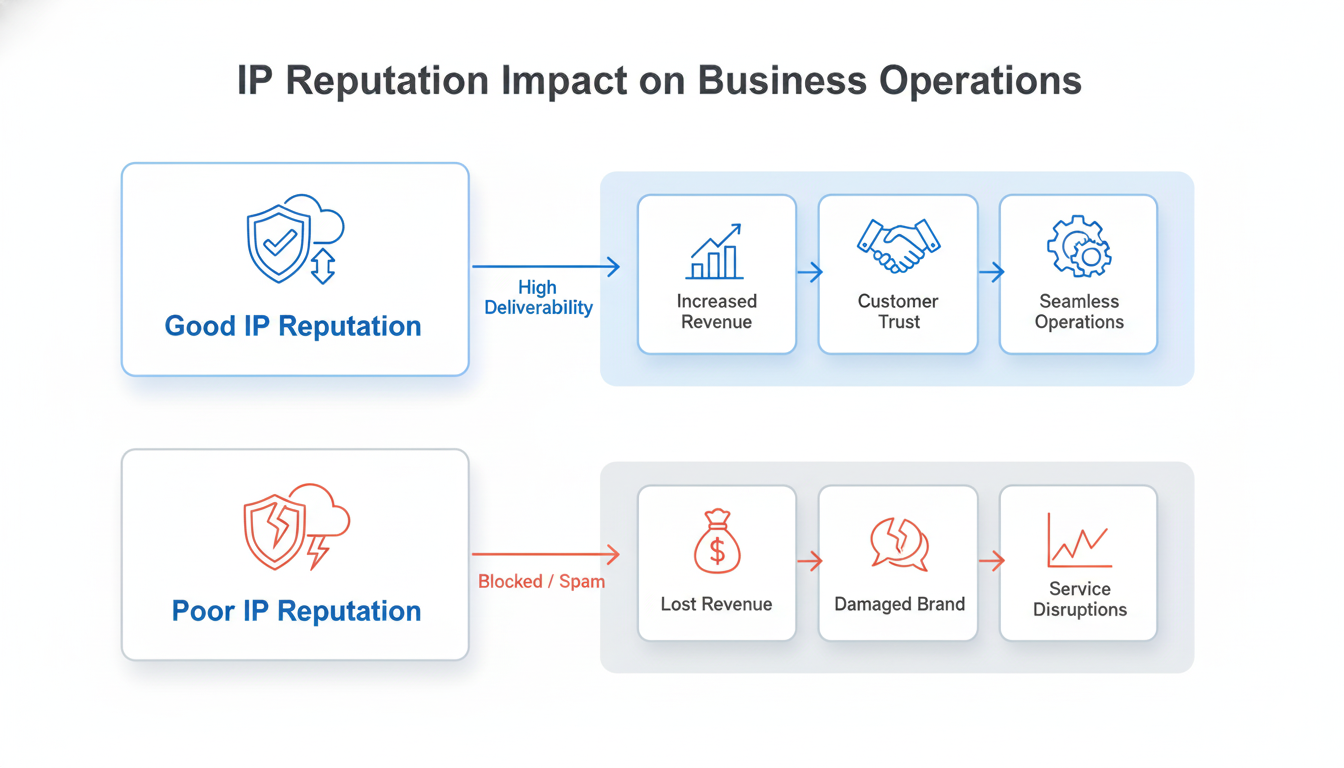
🎯 IP reputation directly impacts your business operations – Poor IP reputation can block email deliverability, limit access to critical services, and damage customer trust
💰 Financial implications are significant – Organizations with compromised IP addresses face increased operational costs, lost revenue from service disruptions, and expensive remediation processes
🚀 Proactive management is essential – Implementing monitoring systems, regular security audits, and clear incident response protocols can prevent most reputation issues before they impact operations
⚠️ Spam remains the #1 threat – Despite technological advances, spam continues to be the primary abuse vector affecting IP reputation across all industries
Visual representation of IP reputation impact on business operations
Why Should Business Leaders Care About Something as ‘Technical’ as IP Reputation?
Imagine arriving at an important client meeting only to discover your company emails have been landing in spam folders for weeks. Your sales team missed crucial opportunities, customer support inquiries went unanswered, and your marketing campaigns generated zero results despite significant investment. This scenario plays out daily for businesses that neglect their IP address reputation.
In simple terms, IP reputation is like your business’s digital credit score. Just as a poor credit rating limits your financial options, a damaged IP reputation restricts your ability to communicate, conduct transactions, and maintain customer trust in the digital realm. It’s not just a technical concern-it’s a fundamental business asset that directly impacts your bottom line.
The digital landscape has evolved dramatically since I began working in IP management eight years ago. What was once a niche technical concern has become a critical business priority. With the increasing scarcity of IPv4 addresses (the internet’s primary addressing system) and the growing sophistication of spam detection systems, maintaining clean IP reputation has transformed from an IT department responsibility into a strategic business imperative.
In my role at InterLIR, I’ve witnessed firsthand how IP reputation issues can paralyze operations across organizations of all sizes. From multinational corporations to emerging startups, the inability to send emails, access critical services, or maintain customer trust due to IP reputation problems creates immediate and costly business disruptions.
In this guide, I will break down what IP reputation is in simple terms, explain why managing it correctly is critical for your business, and provide a clear roadmap for making smart decisions about this increasingly valuable digital asset. Let’s start by understanding how these digital identifiers became so important in the first place.
Where Did These Digital Assets Come From, and Why Are They Scarce?
To understand the current landscape, let me take you back to the early days of the internet. In the 1980s and early 1990s, IP addresses were abundant resources, freely distributed to organizations that requested them. Think of it like the early days of a small town, where land was plentiful and available to anyone willing to develop it.
From Digital Frontier to Valuable Real Estate
As the internet exploded in popularity throughout the 1990s and 2000s, something fundamental changed. The original addressing system, IPv4, was designed with approximately 4.3 billion possible addresses. This seemed inexhaustible at the time, but no one anticipated the explosive growth of internet-connected devices. Suddenly, what had been an abundant resource became increasingly scarce.
I often explain this transformation to clients using a real estate analogy. Imagine a rapidly growing city where all the land has been claimed, yet more people arrive daily needing space. In the IP address world, we reached this critical point in 2011 when IANA (the Internet Assigned Numbers Authority) allocated the last blocks of unused IPv4 addresses to regional registries.
This shift from abundance to scarcity created a high-stakes market with significant implications for businesses. IP addresses transformed from simple technical resources into valuable digital assets with real financial value. At InterLIR, we’ve seen IPv4 addresses appreciate considerably in value, with prices increasing from around $15 per address in 2018 to between $27-50 per address in 2024, depending on block size and region.
The Birth of IP Reputation Systems
As IP addresses became valuable assets, another critical development occurred: the rise of reputation-based filtering systems. Email providers and network security companies began tracking the behavior associated with IP addresses to combat the growing problem of spam and malicious activities.
This created a new dimension of value beyond mere scarcity. An IP address with a clean reputation became significantly more valuable than one with a history of suspicious activity. I’ve worked with clients who discovered too late that the IP addresses they acquired had previously been used for spam campaigns, rendering them practically unusable for legitimate business purposes.
The combination of physical scarcity and the importance of reputation created a complex market dynamic that continues today. Organizations now face dual challenges: securing the IP addresses they need while ensuring those addresses maintain pristine reputations that allow unhindered business operations.
How Can Your Organization Effectively Monitor and Protect IP Reputation?
Based on my experience managing thousands of IP addresses at InterLIR, I’ve found that effective reputation management requires a structured approach combining proactive monitoring, preventative measures, and clear incident response procedures. Let me break this down into a practical framework.
Step 1: Establishing Your IP Reputation Baseline (The ‘Credit Report’)
Before you can protect your IP reputation, you need to understand its current status. Just as you would check your credit report before applying for a loan, you should regularly assess how your IP addresses are perceived across the internet.
At InterLIR, we conduct comprehensive reputation checks for all IP addresses in our marketplace. This process involves checking multiple reputation databases and blocklists to ensure addresses are clean before they’re made available to clients. You should implement a similar process for your organization’s IP resources.
1️⃣ Identify All Your IP Assets – Create a complete inventory of all IP addresses used by your organization, including those assigned to cloud services, email servers, and other digital infrastructure
2️⃣ Check Major Blocklists – Verify your IP addresses against major blocklists like Spamhaus, Barracuda, SORBS, and SpamCop
3️⃣ Assess Sender Scores – For email-sending IPs, check sender reputation scores through services like Sender Score, Google Postmaster Tools, or Microsoft SNDS
4️⃣ Document Baseline Status – Create a central repository documenting the current reputation status of all your IP addresses
5️⃣ Establish Monitoring Schedule – Determine how frequently you’ll check reputation (daily for critical services, weekly for others)
Step 2: Implementing Preventative Measures (The ‘Insurance Policy’)
Once you understand your current reputation status, the next step is implementing systems to prevent reputation damage. In my experience, prevention is significantly less expensive and disruptive than remediation.
🔒 Secure Authentication Systems – Implement strong authentication for all systems that can send outbound traffic from your IP addresses to prevent unauthorized use
📊 Traffic Monitoring – Deploy systems that analyze outbound traffic patterns to identify anomalies that might indicate compromise
🚫 Rate Limiting – Implement rate limits on outbound communications, especially email, to prevent mass spamming if systems are compromised
📧 Email Authentication – Configure SPF, DKIM, and DMARC records to prevent email spoofing from your domains
🔍 Regular Security Audits – Conduct periodic assessments of your IP infrastructure to identify potential vulnerabilities
At InterLIR, we’ve found that implementing these preventative measures reduces abuse incidents by approximately 30%, saving significant time and resources that would otherwise be spent on remediation.
Step 3: Creating an Incident Response Plan (The ‘Emergency Protocol’)
Despite best preventative efforts, reputation incidents can still occur. Having a clear, documented response plan is crucial for minimizing impact and quickly restoring normal operations.
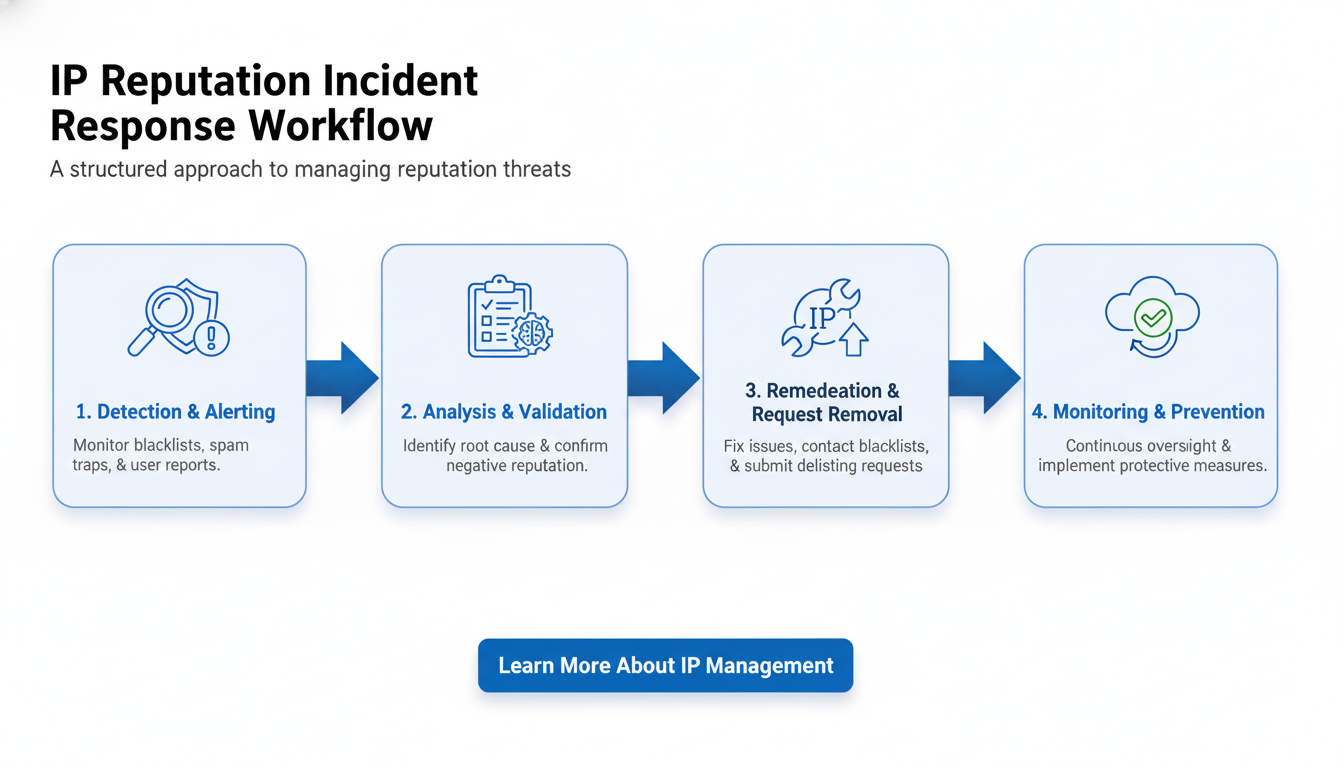
Response Phase
Key Actions
Responsible Team
Detection
Monitor blocklists and reputation scores, receive abuse reports
Security Operations
Assessment
Determine affected IPs, identify abuse type, evaluate business impact
Security & Business Operations
Containment
Isolate affected systems, implement temporary blocks if necessary
IT Infrastructure
Remediation
Address root cause (malware removal, fixing vulnerabilities)
Security & IT Teams
Recovery
Request delisting from blocklists, restore normal operations
Compliance & Operations
Documentation
Record incident details, update procedures to prevent recurrence
All Teams
The speed of your response directly impacts how quickly your IP reputation can recover. In my experience managing abuse cases at InterLIR, incidents addressed within 24 hours typically see reputation recovery within 3-5 days, while delayed responses can extend recovery time to weeks or even months.
IP reputation incident response workflow diagram
What is the True Business Cost of Getting IP Reputation Wrong?
When discussing IP reputation with business leaders, I often encounter the misconception that this is merely a technical issue with limited business impact. Let me be clear: IP reputation problems directly affect your bottom line through multiple channels.
The Hidden Costs of Neglecting IP Reputation
💸 Lost Revenue from Communication Failures – When your emails land in spam folders or are blocked entirely, you lose direct communication with customers, prospects, and partners. One client discovered their sales team’s outreach emails had a 70% lower delivery rate due to IP reputation issues, directly impacting their pipeline
🔥 Brand Damage from Security Incidents – IP addresses associated with your brand that engage in suspicious activities (even unintentionally) damage customer trust. According to research, 87% of consumers will hesitate to do business with a company that has experienced a security breach
📉 Wasted Marketing Investment – Marketing campaigns relying on email or web-based communication channels fail to reach their audience when IP reputation issues exist. One e-commerce client estimated a loss of €45,000 in a single campaign due to delivery problems
⏱️ Operational Disruption and Recovery Costs – When critical IP addresses are blocklisted, IT teams must divert from planned projects to emergency remediation. The average cost of IP reputation remediation for a mid-sized business can exceed $10,000 in direct costs and lost productivity
Case Study: The Expensive Lesson of Acquired IP Addresses
Let me share a real example that illustrates these costs. A mid-sized software company acquired a block of IP addresses from a third-party broker without conducting proper reputation due diligence. Unknown to them, these addresses had previously been used for spam campaigns and were listed on several major blocklists.
After configuring their new infrastructure using these addresses, they launched a major product update announcement to their customer base of approximately 15,000 users. Due to the poor reputation of their newly acquired IP addresses, over 60% of these critical communications were blocked or filtered to spam folders.
The consequences were severe and immediate:
🚫 Customer Support Crisis – Their support team was overwhelmed with calls from customers who hadn’t received update instructions
💻 Failed Update Deployment – Many customers continued using the outdated version, creating security vulnerabilities and compatibility issues
💰 Emergency Remediation Costs – They had to engage a specialized consultant to address the blocklisting issues at a cost of $15,000
⏰ Extended Recovery Timeline – It took nearly three weeks to fully restore their IP reputation, during which time their communication capabilities remained compromised
The total estimated cost of this incident, including remediation expenses, lost productivity, and damaged customer relationships, exceeded $75,000. All of this could have been prevented with proper IP reputation verification before acquisition-a service that would have cost less than $1,000.
Justifying Investment in Quality IP Management
When I consult with business leaders about IP management, I emphasize that investing in proper IP reputation management isn’t an IT expense-it’s business insurance that protects revenue streams, marketing investments, and customer relationships. The return on investment becomes clear when you consider the potential costs of reputation incidents.
At InterLIR, we’ve found that organizations implementing comprehensive IP reputation management typically spend 5-7% of what they would incur in a significant reputation incident. This preventative approach not only reduces risk but also provides operational stability that supports business growth and customer trust.
What Strategic Approaches Should Leaders Take to IP Reputation in 2024?
Based on my experience managing IP resources for diverse organizations, I’ve identified several strategic approaches that business leaders should consider implementing in 2024 and beyond.
The Evolving IP Reputation Landscape
🔮 AI-Powered Reputation Systems – Major email providers and security companies are increasingly deploying sophisticated AI systems to evaluate IP reputation. These systems analyze behavioral patterns rather than simply checking static blocklists, making reputation management more complex but potentially more accurate
🔧 Reputation Data Consolidation – We’re seeing increased sharing of reputation data between previously siloed systems. An IP address flagged by one provider is more quickly recognized by others, accelerating both the spread of negative reputation and the benefits of positive reputation
📈 Rising Value of Clean IP Addresses – As IPv4 scarcity continues and reputation systems become more sophisticated, the market value of addresses with pristine reputations continues to increase. At InterLIR, we’ve observed premium pricing for addresses with established positive history
🌐 IPv4 Marketplace & LIR Services
GLOBAL IP ADDRESS SOLUTIONS
Professional broker services for secure IP transfers, reputation-clean address blocks, and LIR support across all regional registries.
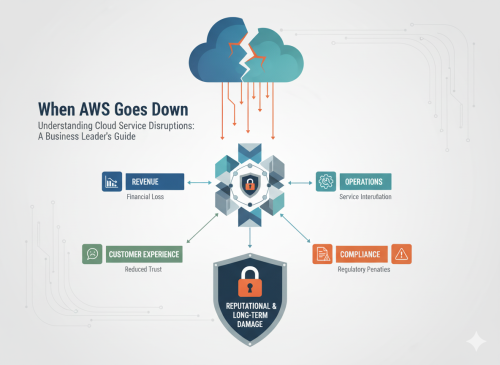
When AWS DynamoDB failed in October 2025, thousands of businesses discovered that cloud outages aren’t just IT problems—they’re business continuity events that directly impact revenue, customer trust, and operational capability. Learn how to protect your organization.
🎯 Cloud service disruptions are business continuity events – not just technical problems. The AWS DynamoDB incident demonstrates how a single technical failure can cascade across multiple services, affecting business operations.
💰 Financial implications extend beyond downtime – Organizations face revenue loss from transaction failures, customer churn from service unavailability, and recovery costs that can exceed planned IT budgets.
🚀 Multi-region strategies are essential – Businesses that implemented cross-region redundancy maintained operations during the AWS outage, while those dependent on a single region experienced significant disruption.
⚠️ Hidden dependencies create unexpected vulnerabilities – Most organizations are unaware of the complex interdependencies between cloud services until an outage reveals them, often too late to mitigate impact.
Why Should Business Leaders Care About ‘Technical’ Cloud Disruptions?
Imagine arriving at your office to discover your company’s e-commerce platform is down, customer support tickets are piling up, and your team can’t deploy a critical security patch. Your CTO explains it’s due to “a DNS race condition in AWS DynamoDB that cascaded to EC2 and NLB services.” For most executives, this sounds like technical jargon that belongs in the IT department. But should it be?
In simple terms, cloud service disruptions are business continuity events that directly impact revenue, customer trust, and operational capability. They’re not just technical problems-they’re business problems that require strategic understanding and executive attention.
From my experience leading InterLIR, a specialized IPv4 marketplace, I’ve seen how infrastructure failures create immediate business impact. Services become unreachable. Transactions fail. Customer experience suffers.
The technical details matter less than understanding the business implications and having strategies to maintain operations.
The October 2025 AWS service disruption illustrates this perfectly. A race condition in DynamoDB’s DNS management system cascaded into a 15-hour disruption affecting thousands of businesses. Companies without proper resilience strategies faced significant consequences.
This guide breaks down cloud disruptions in business terms and provides a framework for smart resilience decisions. You don’t need to become a technical expert—just understand enough to ask the right questions.
How Do Cloud Services Fail, and What Makes These Failures Different from Traditional IT Outages?
Traditional IT outages typically affect a single system or location. When your company’s email server crashed in the past, it was an isolated incident with clear boundaries. Cloud service disruptions are fundamentally different-they’re more like a complex chain reaction that spreads unpredictably through interconnected systems.
The Evolution of IT Infrastructure Failures
In the early days, infrastructure was simple. Each company had its own servers. When something failed, the impact was contained. You could see and touch your infrastructure—risks were tangible.
Today’s cloud infrastructure is different. It’s like a vast, interconnected city. Services are deeply interdependent, creating complex failure patterns that propagate unpredictably.
When one critical service fails, it can trigger cascades across seemingly unrelated systems—like a power outage affecting transportation, commerce, and communications throughout an entire city.
Anatomy of a Modern Cloud Failure
The AWS incident exemplifies this new reality. Let’s break down what happened in business terms:
The Initial Failure – A race condition in DynamoDB’s DNS management system caused the service to become unreachable. Think of this as the main power station in our city analogy experiencing a critical failure.
The Cascade Effect – This initial failure triggered problems in EC2 (compute services) and NLB (network load balancers), which depend on DynamoDB. In our city analogy, this is like the power outage causing traffic lights to fail, which then creates gridlock throughout the transportation system.
The Recovery Challenge – Even after the initial DynamoDB issue was fixed, the secondary systems remained impaired due to backlogs and retry storms. This is similar to how traffic congestion persists long after traffic lights are restored.
What makes this particularly challenging is that most organizations were unaware of these dependencies until they experienced the impact. Many business leaders discovered critical vulnerabilities in their cloud architecture only after their services were already affected.
The Hidden Complexity of Cloud Dependencies
Cloud services hide complexity to make systems easier to use. This delivers benefits, but it also obscures the intricate web of dependencies that can affect your business.
Comparison of traditional IT failures versus cloud service disruptions and their business implications
Traditional IT Failure
Cloud Service Disruption
Business Implication
Server hardware failure
DNS race condition triggering cascading service failures
What appears as a simple component failure can affect multiple business functions simultaneously
Network outage in your data center
Region-wide service degradation
Scale of impact is orders of magnitude larger
Clear ownership and control of recovery
Dependency on cloud provider’s recovery processes
Limited ability to directly influence resolution timeframes
Predictable impact on specific systems
Unpredictable propagation across services
Difficulty in assessing total business impact during an incident
This fundamental difference requires a new approach to business continuity planning. The AWS incident demonstrates that technical architecture decisions have direct business implications that extend far beyond the IT department. Understanding these implications is now a core business leadership responsibility.
What Business Impacts Should Leaders Anticipate During Cloud Disruptions?
When cloud services fail, impacts extend far beyond “system downtime” or “error rates.” They translate directly into business consequences affecting revenue, customer experience, operational capability, and regulatory compliance.
Business impact flowchart showing how cloud disruptions affect revenue, operations, customer experience, and compliance
Immediate Revenue Impacts
During the AWS disruption, businesses experienced several direct revenue impacts:
💸 Transaction failures – E-commerce platforms dependent on DynamoDB for inventory or payment processing experienced failed transactions. One retail client reported losing approximately $150,000 in sales during a four-hour period when their checkout process was unavailable.
🔄 Subscription management disruptions – SaaS companies using affected services for subscription management faced challenges processing new subscriptions and renewals, creating revenue leakage.
📉 Marketing campaign ineffectiveness – Companies running time-sensitive promotions found their campaigns undermined when customers couldn’t complete purchases, wasting marketing spend and opportunity.
These impacts varied dramatically based on architecture choices. Companies with multi-region strategies maintained partial functionality. Those dependent on a single region faced complete disruption.
This demonstrates how technical architecture decisions directly influence business resilience and revenue protection.
Operational Capability Degradation
Beyond direct revenue impacts, the disruption affected organizations’ ability to operate effectively:
🚫 Deployment freezes – Organizations couldn’t launch new EC2 instances, forcing them to delay planned software releases and infrastructure scaling. One financial services company had to postpone a critical security patch deployment by 24 hours.
🔍 Monitoring blindness – Many companies lost visibility into their systems when monitoring tools dependent on affected services stopped functioning, hampering their ability to assess impact and respond effectively.
🧯 Incident response limitations – Technical teams found themselves unable to implement standard remediation procedures that required launching new resources or accessing affected services.
These operational impacts created secondary business consequences. The delayed security patch deployment, for example, created compliance exposure requiring disclosure to regulators.
Customer Experience Degradation
Perhaps the most significant business impact came through degraded customer experiences:
😠 Increased support volume – Companies reported support ticket volumes increasing by 300-500% during the disruption, overwhelming support teams and creating additional operational challenges.
🔁 Repetitive error experiences – Customers attempting to use services encountered frustrating error messages or spinning loading indicators, creating negative brand associations.
💔 Trust erosion – For services where reliability is a key value proposition (financial services, healthcare, critical business tools), the disruption damaged brand perception and trust.
Customer experience impact often lasted longer than the technical disruption itself. Customer confidence takes approximately 2-3 times longer to restore than the actual service.
This creates a “trust debt” that businesses must repay through consistent reliability after an incident.
The True Cost Calculation
When calculating the true business cost of cloud disruptions, leaders must consider multiple factors:
Comprehensive cost calculation framework for cloud service disruptions
Cost Category
Examples
Calculation Approach
Direct Revenue Loss
Failed transactions, subscription disruptions
Transaction volume × average value × disruption percentage
Operational Costs
Overtime, emergency response, recovery efforts
Additional labor hours × fully loaded cost
Customer Impact
Support surge, reputation damage, churn
Support volume increase × handling cost + estimated churn value
Opportunity Costs
Delayed launches, competitive disadvantage
Estimated value of delayed initiatives
Compliance Consequences
Regulatory reporting, potential penalties
Direct costs + risk-adjusted potential penalties
This comprehensive view of business impact should inform both recovery priorities during an incident and investment decisions for resilience strategies. The organizations that weathered the AWS disruption most effectively were those that had previously conducted this analysis and invested accordingly.
How Can Organizations Build Practical Cloud Resilience Without Breaking the Budget?
Building cloud resilience isn’t just about implementing the most robust technical solutions-it’s about making strategic investments based on business priorities. The AWS incident provides valuable insights into effective approaches that balance cost with protection.
The Resilience Spectrum: From Basic to Advanced
Cloud resilience exists on a spectrum, with different approaches offering varying levels of protection at different cost points:
🔹 Basic resilience – Focused on recovery rather than continuity, this approach accepts some downtime but ensures data is protected and services can be restored. This is appropriate for non-critical business functions.
🔶 Enhanced resilience – Implements redundancy within a region and basic cross-region capabilities for the most critical components. This approach can maintain core functionality during many types of disruptions.
🔷 Advanced resilience – Employs active-active multi-region architectures with automated failover. This approach maintains near-continuous operations but at significantly higher cost and complexity.
During the AWS incident, organizations across this spectrum experienced dramatically different outcomes. Those with basic resilience faced complete disruption. Those with advanced resilience maintained operations with minimal impact.
The key insight: targeted resilience—applying the right level of protection to each business function based on its criticality—delivered the best return on investment.
Strategic Approaches to Cloud Resilience
Based on the AWS incident and our experience at InterLIR working with organizations managing critical network resources, I recommend these strategic approaches:
Business function prioritization – Categorize your business functions by criticality, considering both revenue impact and customer experience. This creates a clear framework for resilience investment decisions.
Dependency mapping – Identify the complete chain of cloud service dependencies for each critical business function. The AWS incident demonstrated how hidden dependencies can undermine resilience strategies.
Targeted multi-region implementation – Apply multi-region architectures to your most critical functions first. During the AWS incident, even partial multi-region implementation provided significant protection.
Graceful degradation design – Engineer systems to maintain core functionality even when some components are unavailable. This approach delivered substantial business protection at moderate cost.
Regular resilience testing – Validate your resilience strategies through controlled testing. Organizations that had previously tested regional failure scenarios responded more effectively during the actual incident.
This strategic approach achieves meaningful resilience without the prohibitive cost of advanced protection for all systems.
It’s about making smart investments based on business priorities.
Cost-Effective Resilience Patterns
Several specific technical patterns proved particularly effective during the AWS incident while maintaining reasonable cost profiles:
💡 Read replicas across regions – Organizations that replicated read-only data across regions maintained the ability to retrieve information even when write operations were impacted. This pattern costs significantly less than full active-active implementations while preserving critical capabilities.
💡 Static fallbacks – Services that implemented static fallback content maintained basic customer experiences during the disruption. This simple pattern delivered substantial brand protection at minimal cost.
💡 Circuit breakers and bulkheads – Systems designed to isolate failures prevented the cascade effect that amplified the AWS disruption. These architectural patterns add minimal cost while significantly improving resilience.
💡 Asynchronous processing – Organizations that designed systems to queue operations for later processing maintained functionality during the disruption and recovered more quickly afterward.
These patterns don’t require duplicating entire infrastructures across regions. Instead, they focus on maintaining critical capabilities through targeted resilience strategies.
This approach delivers substantial business protection at a fraction of the cost of full redundancy.
What Questions Should Leaders Ask Their Technical Teams About Cloud Resilience?
As a business leader, you don’t need to understand every technical detail. But you do need to ask the right questions to ensure your organization is protected.
The AWS incident highlights critical areas of inquiry that help assess your cloud resilience posture and make informed decisions about risk management and resource allocation.
Frequently Asked Questions
How long do cloud service disruptions typically last?
+
Cloud service disruptions can vary significantly in duration. The AWS DynamoDB incident lasted approximately 15 hours, but impacts can extend well beyond the initial technical resolution due to cascading effects, retry storms, and recovery backlogs. Most major cloud providers aim for 99.99% uptime, but even brief disruptions can cause significant business impact depending on your architecture.
What’s the difference between multi-region and multi-availability zone redundancy?
+
Multi-availability zone (AZ) redundancy protects against failures within a single data center or region, while multi-region redundancy protects against entire regional outages. During the AWS incident, multi-AZ setups within the affected region still experienced disruption, while multi-region architectures maintained operations. For critical business functions, multi-region strategies provide the highest level of protection.
How much does implementing cloud resilience cost?
+
Cloud resilience costs vary based on your approach. Basic resilience (backup and recovery) adds minimal cost. Enhanced resilience with targeted multi-region capabilities typically increases infrastructure costs by 20-40%. Advanced active-active multi-region architectures can double costs but provide near-continuous operations. The key is matching resilience investment to business criticality—not every system needs the highest level of protection.
Can I rely on cloud provider SLAs for protection?
+
While cloud provider SLAs provide service level guarantees, they typically offer credits rather than preventing business impact. During the AWS incident, affected customers received service credits, but these rarely compensate for actual business losses including revenue, customer churn, and operational disruption. SLAs are important, but they shouldn’t be your primary resilience strategy.
How do I identify hidden dependencies in my cloud architecture?
+
Hidden dependencies are one of the biggest challenges in cloud resilience. Start by mapping your critical business functions to their underlying cloud services, then trace dependencies through each service layer. Use cloud provider dependency mapping tools, conduct regular architecture reviews, and test failure scenarios. Many organizations discover critical dependencies only during actual incidents—proactive discovery is essential.
What should I prioritize when building cloud resilience?
+
Prioritize based on business impact: revenue-generating functions, customer-facing services, and compliance-critical systems should receive the highest resilience investment. Start with dependency mapping, then implement multi-region strategies for your most critical functions. Design for graceful degradation so systems maintain core functionality even when some components fail. Regular testing and validation are essential—resilience strategies that aren’t tested may not work when needed.
🌐 IPv4 Marketplace & LIR Services
GLOBAL IP ADDRESS SOLUTIONS
Professional broker services for secure IP transfers, reputation-clean address blocks, and LIR support across all regional registries.
🎯 Strategic Importance – Internet resources like IPv4 addresses are critical business assets that directly impact your operational capabilities and digital presence
💰 Financial Reality – The scarcity of IPv4 addresses has transformed them from technical resources into valuable business assets with significant market value
🚀 Business Action – Organizations should develop a clear strategy for securing, managing, and potentially monetizing their IP resources through legitimate marketplaces
⚠️ Risk Awareness – Poor IP resource management can lead to business disruption, security vulnerabilities, and missed market opportunities
Why Should a ‘Technical’ Topic Like Internet Resource Governance Matter to Business Leaders?
Imagine waking up to discover your company’s online services are inaccessible to customers, your email deliverability has plummeted, and your digital marketing campaigns are failing to reach their targets. The culprit? Issues with your organization’s IP addresses – the digital equivalent of your business’s street address and reputation in the online world.
In simple terms, Internet resource governance is like the property management system for the digital world. It determines who gets which digital “real estate” (IP addresses), under what conditions, and how these critical resources are managed over time. For business leaders, understanding this governance isn’t just a technical nicety – it’s a strategic imperative that directly impacts your bottom line.
The RIPE Address Policy Working Group (AP WG) is one of the most influential forums where these governance decisions are made. As a specialized IPv4 address marketplace, at InterLIR we’ve observed firsthand how policy changes discussed in these forums directly impact our clients’ ability to acquire the resources they need for business growth and continuity.
The recent RIPE 90 meeting – the 90th gathering of this influential Internet governance body – included critical discussions about the future of IP address management that will shape how organizations access and utilize these essential resources. With IPv4 addresses now essentially exhausted as a free resource, businesses face a new reality where strategic management of these assets is no longer optional.
In this guide, I will break down what Internet resource governance is in business terms, explain why understanding RIPE policy developments is critical for your organization, and provide a clear roadmap for making informed decisions about your IP resource strategy. Whether you’re in cybersecurity, telecommunications, hosting, SaaS development, or any digital business, these insights will help you navigate the increasingly complex landscape of Internet resource management.
Where Did These Digital Assets Come From, and Why Are They So Valuable?
To understand why IP addresses have become such valuable business assets, we need to look at their evolution from simple technical identifiers to scarce digital resources. When the Internet was first designed in the 1970s and early 1980s, no one anticipated the explosive growth that would follow. The original addressing system, IPv4, was created with approximately 4.3 billion possible addresses – a number that seemed inexhaustible at the time.
From Technical Resource to Business Asset
In the early days of the Internet, IP addresses were freely distributed to organizations that could demonstrate a need. Regional Internet Registries (RIRs) like RIPE NCC in Europe, ARIN in North America, and others around the world were established to manage these distributions. The process was primarily technical and administrative rather than financial or commercial.
However, as Internet adoption accelerated globally, what once seemed like an unlimited resource began to dwindle. By 2011, IANA (Internet Assigned Numbers Authority) had allocated its last blocks of free IPv4 addresses to the regional registries. By 2019, RIPE NCC – which serves Europe, the Middle East, and parts of Central Asia – announced it had reached IPv4 exhaustion, meaning they could no longer fulfill requests for new IPv4 allocations from their free pool.
This scarcity transformed what was once a freely available technical resource into a valuable business asset. Today, IPv4 addresses trade on specialized marketplaces for approximately $27-50 per IP address, with some blocks commanding premium prices based on their characteristics and history.
The Birth of Internet Resource Governance
As IP addresses became scarce and valuable, the need for formal governance structures grew. The RIPE Address Policy Working Group emerged as a critical forum where stakeholders from across the Internet ecosystem – network operators, service providers, academic institutions, and businesses – could collaboratively develop policies for fair and efficient resource management.
Unlike many governance structures, RIPE operates on a bottom-up, consensus-driven model. Policies aren’t imposed from above but are developed through open discussion and community agreement. This approach ensures that the resulting frameworks reflect the practical needs of the organizations that rely on these resources.
This shift from abundance to scarcity created a high-stakes environment where businesses must now strategically manage their IP resources. Organizations that once treated IP addresses as mundane technical details now recognize them as valuable assets that require executive attention and strategic planning.
How Can a Business Safely Acquire and Manage These Digital Assets?
For many organizations, the exhaustion of free IPv4 resources means turning to the transfer market to acquire the addresses needed for growth and operations. However, this market comes with significant risks that business leaders must understand and mitigate. At InterLIR, we’ve developed a framework for safe IP resource acquisition that protects businesses from common pitfalls.
Step 1: Verifying IP Address History (The “Background Check”)
Just as you wouldn’t purchase a property without checking its history, acquiring IP addresses requires thorough due diligence. IP addresses have reputations based on their previous use, and this digital “credit score” directly impacts their business value and utility.
When an IP address has been used for spam, fraud, or other malicious activities, it often ends up on blocklists. These blocklists are used by email providers, security systems, and other online services to filter traffic. If your business acquires tainted IP addresses, you may find your legitimate emails being blocked, your advertisements rejected, or your services flagged as potentially dangerous.
Professional IP address marketplaces conduct comprehensive reputation checks across multiple databases and blocklists to ensure the addresses they offer are “clean” and suitable for business use. This verification is not a one-time check but an ongoing process that monitors for issues that could affect address utility.
Step 2: Confirming Legitimate Ownership (The “Title Search”)
The IP address market has unfortunately attracted its share of questionable practices. Some addresses are offered for sale or lease by entities that don’t legitimately control them. Acquiring addresses from unauthorized sources can lead to sudden service disruptions if the rightful holder reclaims them.
Legitimate ownership verification involves checking the current registration in the relevant Regional Internet Registry (RIR) database, confirming the chain of custody, and ensuring proper documentation of any transfers. This process is similar to verifying property titles in real estate transactions and is essential for secure IP resource acquisition.
At InterLIR, we maintain direct relationships with legitimate IP address holders and verify all ownership claims through official RIR records before facilitating any transfers. This due diligence protects businesses from the significant risks associated with unauthorized address acquisition.
Process diagram showing safe IP address acquisition workflow
Step 3: Secure Transaction Processing (The “Escrow Service”)
The financial aspects of IP address transactions require careful management to protect both buyers and sellers. Professional IP marketplaces implement secure transaction processes that ensure sellers receive payment only when buyers have confirmed receipt of properly functioning IP resources.
This process includes verification of technical routing details, confirmation of database records, and testing of address functionality before finalizing transactions. For leased addresses, ongoing monitoring ensures continued availability and performance throughout the lease period.
Aspect
The Risky Way
The Safe Way
Business Impact
Reputation Verification
No checking of IP history or blocklists
Comprehensive checking across multiple reputation databases
Avoid marketing failures, email delivery issues, and customer trust problems
Ownership Verification
Taking seller’s word about control of resources
Verification through official RIR records and documentation
Prevent sudden loss of critical infrastructure and associated downtime
Transaction Security
Direct payment without verification
Escrow-like processes with verification before final payment
Protect financial investment and ensure receipt of functioning resources
Documentation
Minimal or no formal documentation
Complete transfer documentation and technical support
Simplify compliance, auditing, and technical implementation
By following these three critical steps, businesses can safely navigate the IP address marketplace and acquire the resources they need without exposing themselves to unnecessary risks. Professional IP resource marketplaces like InterLIR specialize in managing this process end-to-end, allowing business leaders to focus on their core operations while ensuring their digital infrastructure remains secure and reliable.
What is the True Business Cost of Getting Internet Resource Management Wrong?
When business leaders treat IP address management as merely a technical issue rather than a strategic business concern, they expose their organizations to significant risks and hidden costs. Let me share what we’ve observed across hundreds of client engagements at InterLIR.
The Hidden Costs of a ‘Cheap’ Solution
💸 Revenue Loss from Downtime – When IP addresses are reclaimed due to improper acquisition or management, critical services can go offline. For e-commerce businesses, this can mean thousands or even millions in lost revenue per hour.
🔥 Brand Damage from Security Incidents – Using IP addresses with poor reputations can trigger security alerts for your customers, damaging trust. One client came to us after discovering their marketing emails were being automatically flagged as suspicious due to previously acquired IP addresses with spam history.
📉 Wasted Marketing Spend – Digital marketing campaigns rely on clean IP infrastructure. When advertisements or emails are blocked due to IP reputation issues, marketing budgets are essentially wasted. A SaaS client discovered they were losing approximately 30% of their email marketing effectiveness due to deliverability issues tied to problematic IP addresses.
👥 Decreased Employee Productivity – Technical teams forced to constantly troubleshoot IP-related issues are diverted from innovation and improvement. One client estimated they were spending 15-20 hours per week addressing IP-related problems before implementing a proper management strategy.
⚖️ Compliance and Legal Exposure – Improper IP resource documentation can create regulatory compliance issues, particularly in industries with strict data protection requirements. Several financial services clients have cited this as a primary motivation for professionalizing their IP resource management.
Justifying Investment in Quality
Professional IP resource management should be viewed not as a cost center but as an insurance policy that protects critical business infrastructure. The premium paid for properly vetted, legitimately acquired, and professionally managed IP resources is minimal compared to the potential costs of service disruptions, security incidents, and reputation damage.
For most businesses, IP addresses represent a foundational layer of their digital infrastructure – similar to the foundation of a building. Cutting corners on this foundation to save money in the short term inevitably leads to costly problems down the road.
Consider this real-world example: A rapidly growing cybersecurity firm acquired a block of IP addresses through an informal channel at approximately 40% below market rate. Within three months, they discovered these addresses were being reclaimed by the legitimate owner who had never authorized the sale. The resulting service disruption affected their client monitoring systems for nearly 48 hours, triggered several SLA violations, and ultimately cost them a major client worth over €200,000 annually. What initially seemed like a €12,000 saving on IP acquisition ultimately resulted in losses exceeding eight times that amount.
By contrast, clients who invest in professional IP resource management typically report significant reductions in technical incidents, improved service reliability, and enhanced ability to focus on their core business rather than addressing infrastructure problems. The return on investment becomes evident within the first year of implementation.
What is the Smart Leader’s Roadmap for Internet Resource Governance?
As Internet resource governance continues to evolve through forums like the RIPE Address Policy Working Group, business leaders need a clear strategy for navigating this changing landscape. Based on our experience working with hundreds of organizations across various sectors, here’s a practical roadmap for effective IP resource management.
What’s Next for Digital Assets?
🔮 Increasing Value of Quality IPv4 Resources – As policies around IP transfers continue to evolve, clean IPv4 addresses with good reputation histories will likely continue to appreciate in value. Organizations with unused IP resources may find significant monetization opportunities.
🔧 More Sophisticated Transfer Markets – The RIPE 90 discussions highlighted ongoing refinement of transfer policies. We anticipate more streamlined processes for legitimate transfers while maintaining necessary safeguards against abuse.
📈 Growing Importance of Professional Management – As IP resources become more valuable and governance more complex, professional management services will become increasingly important for businesses that want to focus on their core operations rather than IP infrastructure details.
🌐 Regional Policy Harmonization – Discussions at RIPE 90 showed continued movement toward alignment of policies across different regional registries, potentially simplifying global IP resource management for multinational organizations.
A Leader’s 90-Day Action Plan
1️⃣ Conduct an IP Resource Audit – Work with your technical team to inventory all IP addresses currently in use by your organization. Identify their sources, documentation status, and utilization rates. This baseline assessment is critical for informed decision-making.
2️⃣ Assess Your Risk Exposure – Evaluate how critical IP resources are to your business continuity. Consider factors like email deliverability, service accessibility, and marketing effectiveness. Quantify the potential business impact of IP-related disruptions.
3️⃣ Develop a Resource Strategy – Based on your audit and risk assessment, create a clear strategy for IP resource acquisition, management, and potentially monetization. This should include policies for documentation, security, and compliance.
4️⃣ Engage Professional Support – For most organizations, partnering with specialized IP resource management services provides the most cost-effective approach to ensuring compliance, security, and reliability without diverting internal resources from core business functions.
5️⃣ Implement Monitoring Systems – Establish ongoing monitoring of IP resource
🌐 IPv4 Marketplace & LIR Services
GLOBAL IP ADDRESS SOLUTIONS
Professional broker services for secure IP transfers, reputation-clean address blocks, and LIR support across all regional registries.
RPKI Certification: A Leader’s Guide to Internet Routing Security
Executive Summary: What You Need to Know
🎯 RPKI is a critical security framework that helps prevent routing hijacks and ensures your organization’s online services remain accessible and secure
💰 Business impact is significant – routing incidents can lead to service outages, data theft, and reputation damage that directly affects your bottom line
🚀 Strategic action required – understanding RIPE NCC’s Certification Repository Terms and Conditions is essential for properly implementing routing security measures
⚠️ Risk awareness – failure to implement proper routing security exposes your organization to preventable network disruptions and potential security breaches
Visual representation of RPKI security framework protecting network routes
Why Should a ‘Technical’ Topic Like RPKI Matter to Business Leaders?
Imagine waking up to discover your company’s website is unreachable, your cloud services are down, and customer data is potentially being rerouted to unknown destinations. This nightmare scenario isn’t theoretical-it happens regularly to organizations that haven’t properly secured their internet routing infrastructure. The culprit? Vulnerabilities in how internet traffic finds its way across the global network.
In simple terms, Resource Public Key Infrastructure (RPKI) is like a digital passport system for internet traffic, ensuring that data packets travel only along authorized routes and reach their intended destinations. It’s essentially the difference between shipping your valuable goods through verified, secure carriers versus hoping they’ll arrive safely through unverified channels.
For business leaders, RPKI isn’t just another technical acronym to delegate to your IT department. It represents a fundamental security layer that protects your organization’s digital presence, data integrity, and ultimately, your revenue streams. When internet traffic meant for your services gets misdirected-whether accidentally or maliciously-the consequences can be immediate and severe: service disruptions, data breaches, and damaged customer trust.
The RIPE Network Coordination Centre (RIPE NCC), one of five Regional Internet Registries worldwide, plays a crucial role in this security ecosystem through its Certification Repository. This repository contains the cryptographic materials that validate routing information, essentially serving as the trust anchor for secure internet routing in Europe, the Middle East, and parts of Central Asia.
In this guide, I will break down what RPKI certification is in simple terms, explain why managing it correctly is critical for your business, and provide a clear roadmap for making smart decisions about implementing routing security. Whether you’re a CEO, CFO, or business unit leader, understanding these fundamentals will help you protect your organization’s digital assets and ensure business continuity.
Let’s start by exploring how this system developed and why it has become so crucial in today’s interconnected business environment.
How Did Internet Routing Become So Vulnerable, and Why Does It Matter Now?
The internet wasn’t originally built with security as a primary concern. In the early days, when the internet connected just a handful of research institutions and government agencies, trust was implicit. The system for directing traffic across the internet-known as the Border Gateway Protocol (BGP)-was designed in an era when participants were few and generally trustworthy.
From Academic Network to Global Business Infrastructure
Think of the early internet as a small town where everyone knows each other. In such an environment, you might leave your door unlocked because trust is high and risk is low. The Border Gateway Protocol that routes internet traffic was designed in this “small town” environment-with minimal security features because they simply weren’t needed at the time.
Fast forward to today, and that small town has grown into a sprawling global metropolis. The internet now connects billions of devices and serves as the backbone for worldwide commerce, communication, and critical infrastructure. Yet remarkably, we’re still using essentially the same routing system-BGP-that was designed for that small, trusting community.
This growth created a fundamental security gap in how internet traffic is directed. Without proper verification mechanisms, anyone can potentially announce that they’re the legitimate destination for certain internet traffic-similar to how someone might redirect mail by simply telling the post office “I’m actually the person who should receive these letters.”
The Business Consequences of Routing Vulnerabilities
These vulnerabilities aren’t just theoretical concerns-they’ve resulted in significant business disruptions. In 2008, Pakistan Telecom accidentally hijacked YouTube’s traffic worldwide while attempting to block the service domestically. In 2018, attackers redirected traffic meant for Amazon’s Route 53 DNS service to steal cryptocurrency. More recently, in 2021, a major Facebook outage was exacerbated by routing issues that prevented engineers from remotely accessing the systems they needed to fix.
For businesses, these incidents translate directly to lost revenue, damaged reputation, and potential data breaches. When your traffic is misdirected, customers can’t reach your services, transactions fail, and sensitive information may be exposed to unauthorized parties.
This is where RPKI enters the picture-as the most widely adopted solution to address these fundamental routing security vulnerabilities. By providing cryptographic verification of routing announcements, RPKI helps ensure that internet traffic follows only authorized paths, significantly reducing the risk of both accidental misrouting and deliberate hijacking attempts.
How Does RPKI Actually Protect Your Business’s Internet Presence?
To understand how RPKI protects your business, let’s use a real-world analogy that makes this technical concept more accessible. Think of internet routing like a global postal system, where your company’s online services are a destination that needs to receive mail (internet traffic) correctly.
The Digital Passport System for Internet Traffic
In the traditional postal system, anyone could potentially put any return address on an envelope. Similarly, in the traditional internet routing system, any network could claim to be the legitimate path to reach your online services. RPKI changes this by introducing a verification system-essentially a “digital passport” that proves a network is authorized to announce routes to specific IP addresses.
Here’s how this works in practice: Your organization holds IP addresses (like 192.0.2.0/24) that are essential for your online services. With RPKI, you create a cryptographically signed statement called a Route Origin Authorization (ROA) that declares which Autonomous System (AS)-essentially your internet service provider or your own network-is authorized to announce routes to those IP addresses.
This signed statement is stored in the RIPE NCC Certification Repository, where it becomes part of a global verification system. When other networks receive routing announcements claiming to lead to your IP addresses, they can check these announcements against the ROAs in the repository. If the announcement doesn’t match an authorized ROA, it can be rejected-preventing traffic from being misdirected.
Process diagram showing safe RPKI implementation and verification flow
The RIPE NCC Certification Repository: Your Security Foundation
The RIPE NCC Certification Repository serves as a critical piece of internet infrastructure. It contains several types of cryptographic materials:
🔐 Certificates – Digitally signed objects that bind internet number resources (IP addresses and AS numbers) to public keys
📋 Certificate Revocation Lists (CRLs) – Lists of certificates that have been invalidated before their expiration date
📜 RPKI-signed objects – Including ROAs that authorize specific networks to announce routes to your IP addresses
For business leaders, understanding the Terms and Conditions governing this repository is important because it defines how this critical security infrastructure operates, what responsibilities different parties have, and what limitations exist.
Current and Future Security Capabilities
The RPKI system is evolving to address more sophisticated routing security challenges. Currently, it primarily focuses on origin validation-verifying that the network claiming to be the source of a route is actually authorized to make that claim. However, after November 2025, RIPE NCC plans to implement three new object types that will enhance security further:
Object Type
Status
Business Benefit
ROA (Route Origin Authorization)
Current
Prevents basic route hijacking by verifying route origins
ASPA (Autonomous System Provider Authorization)
Planned (2025+)
Prevents route leaks by verifying legitimate upstream providers
BGPsec
Planned (2025+)
Secures the entire path traffic takes, not just the origin
RSC (RPKI Signed Checklists)
Planned (2025+)
Provides additional verification mechanisms for content
These enhancements will provide more comprehensive protection against sophisticated routing attacks, further securing your organization’s internet presence. For business leaders, this means the RPKI ecosystem is becoming increasingly valuable as a security investment.
What is the True Business Cost of Getting Routing Security Wrong?
When evaluating any security investment, the key question is always: “What’s the cost of not doing this?” For routing security and RPKI implementation, the business costs of inadequate protection can be substantial and multifaceted.
The Hidden Costs of Inadequate Routing Security
💸 Direct revenue loss – When your services become unreachable due to routing incidents, every minute of downtime translates to lost transactions. For e-commerce companies, this can mean thousands or even millions in lost revenue per hour
🔥 Reputation damage – Customers don’t distinguish between “your site is down” and “your traffic was hijacked.” They simply experience your service as unreliable, potentially driving them to competitors
📉 Incident response costs – Resolving routing incidents requires emergency IT response, often at premium rates, and may involve complex coordination with multiple external parties
👥 Data breach liability – If routing hijacks lead to data exposure, your organization may face regulatory penalties, legal action, and mandatory breach notification costs
⏱️ Recovery time – Unlike some technical issues that can be fixed with internal resources, routing incidents often require coordination with external parties, extending the impact timeframe
Real-World Impact: A Cautionary Tale
Consider what happened to a mid-sized financial services company (name withheld for confidentiality) that experienced a routing incident in 2022. For approximately four hours, traffic to their customer portal was misdirected due to a BGP hijack. During this time:
🚫 Customers couldn’t access their accounts or complete transactions
💰 The company lost an estimated $380,000 in direct transaction revenue
📞 Their call center was overwhelmed with support requests, creating additional operational costs
🔍 They had to hire external security consultants to verify no data had been compromised
📱 The incident triggered negative social media attention that persisted for weeks
The total estimated cost of this single incident exceeded $1.2 million when accounting for all direct and indirect impacts. All of this could have been prevented with proper RPKI implementation, which would have cost the company less than $50,000 in one-time implementation costs and minimal ongoing maintenance.
Justifying Investment in Quality Routing Security
Implementing proper routing security through RPKI is not merely a technical expense-it’s a business continuity investment with clear ROI. When properly implemented, RPKI provides:
🛡️ Protection against service disruptions that directly impact revenue
🔒 Reduced risk of data breaches through traffic interception
⚡ Faster incident resolution when routing issues do occur
📊 Improved visibility into your routing infrastructure
🤝 Enhanced trust with customers and partners who increasingly expect security due diligence
For most organizations, the cost-benefit analysis overwhelmingly favors implementing RPKI. The implementation costs are modest compared to the potential losses from even a single significant routing incident.
What is the Smart Leader’s Roadmap for RPKI Implementation?
As a business leader, you don’t need to understand every technical detail of RPKI implementation, but you do need a clear roadmap for ensuring your organization is protected. Here’s a strategic approach that balances technical requirements with business priorities.
Future Trends in Routing Security
🔮 Increasing regulatory pressure – Government agencies are beginning to mandate routing security measures for critical infrastructure and government contractors
🔧 Integration with other security frameworks – RPKI is increasingly becoming part of broader security certification requirements like SOC 2 and ISO 27001
📈 Rising adoption rates – As more organizations implement RPKI, those without it will face greater risks as they become relatively softer targets
🌐 Enhanced capabilities – The planned additions to RPKI (ASPA, BGPsec, RSC) will provide more comprehensive protection against sophisticated attacks
A Leader’s 90-Day Action Plan
1️⃣ Assessment Phase (Days 1-30) – Engage with your technical team to understand your current routing security posture. Key questions to ask: Are our IP resources protected by RPKI? What would be the impact of a routing incident on our critical services? What resources would be required to implement RPKI?
2️⃣ Planning Phase (Days 31-60) – Develop an implementation strategy that addresses both technical requirements and business constraints. Ensure your team understands the RIPE NCC Certification Repository Terms and Conditions, particularly usage restrictions and liability limitations. Allocate appropriate resources for implementation.
3️⃣ Implementation Phase (Days 61-90) – Execute your RPKI implementation plan, focusing first on protecting your most critical IP resources. Establish monitoring procedures to ensure ongoing compliance and effectiveness. Develop incident response procedures specific to routing security issues.
Key Considerations from the Terms and Conditions
When implementing RPKI, be aware of these important provisions from the RIPE NCC Certification Repository Terms and Conditions:
⚠️ Repository updates – The repository is updated every 24 hours, so your validation systems should refresh at least daily
⚠️ Permitted uses – The repository data can only be used for validation and research purposes, not for commercial applications
⚠️ Resource ownership clarification – Certificates do not support claims of “ownership” of Internet number resources, which has implications for asset management
⚠️ Service availability – The repository operates on a best-effort basis, so your
🌐 IPv4 Marketplace & LIR Services
GLOBAL IP ADDRESS SOLUTIONS
Professional broker services for secure IP transfers, reputation-clean address blocks, and LIR support across all regional registries.
IPv4 Address Management: A Leader’s Guide to Network Resource Strategy
Visual representation of IPv4 address blocks and their distribution across global networks
Executive Summary: What You Need to Know
🎯 IPv4 addresses are finite digital assets – With only 4.3 billion possible combinations and growing demand, they’ve become scarce business resources requiring strategic management
💰 Financial implications are significant – Proper IPv4 management directly impacts operational costs, with address leasing offering flexibility while purchase provides long-term stability
🚀 Strategic action is essential – Organizations should conduct IP resource audits, implement address utilization monitoring, and develop a clear acquisition strategy aligned with business growth
⚠️ Risk factors require attention – Poor IP reputation management, inadequate documentation, and improper technical configuration can lead to service disruptions and security vulnerabilities
Why Should a ‘Technical’ Topic Like IPv4 Addressing Matter to Business Leaders?
Imagine opening a new retail location only to discover your business can’t receive mail because there are no available street addresses in the city. This seemingly absurd scenario is precisely what many digital businesses face today with IPv4 addresses. These digital addresses, once abundant and freely available, have become scarce, valuable assets that directly impact your organization’s ability to operate online.
In simple terms, IPv4 addresses are the digital equivalent of real estate in prime locations – finite, increasingly valuable, and essential for business operations. Every device connecting to the internet requires an IP address, functioning as its unique identifier. Without sufficient IP addresses, your organization faces significant constraints on growth, service delivery, and digital innovation.
The business implications extend far beyond the server room. Marketing campaigns can fail when emails are blocked due to poor IP reputation. Customer acquisition costs rise when services experience downtime from IP-related issues. Development teams face delays when they can’t secure the network resources needed for new projects. What was once a purely technical concern has evolved into a strategic business asset requiring executive attention.
As Head of Customer Support at InterLIR, I’ve witnessed firsthand how organizations across industries – from cybersecurity firms to e-commerce platforms – struggle with IPv4 resource management. The companies that thrive are those where leadership understands that IP addressing isn’t just infrastructure – it’s a business-critical asset requiring strategic management.
In this guide, I will break down what IPv4 addressing is in simple terms, explain why managing these resources correctly is critical for your business, and provide a clear roadmap for making informed decisions about your organization’s IP strategy. Let’s begin by understanding how we arrived at this point of digital address scarcity.
Where Did These Digital Assets Come From, and Why Are They Scarce?
The story of IPv4 addresses begins in the early 1980s when the internet was still in its infancy. At that time, the architects of the internet protocol created a system allowing for approximately 4.3 billion unique addresses. This number seemed inconceivably large for a network that connected only a few thousand computers, primarily in academic and research institutions.
From Abundance to Scarcity: The Digital Land Rush
In those early days, IP addresses were distributed liberally. Organizations could request and receive large blocks of addresses with minimal justification. Major corporations, universities, and government agencies were allocated massive ranges – sometimes millions of addresses – based on projected needs rather than actual usage. It was the digital equivalent of claiming vast tracts of undeveloped land during a frontier expansion.
As the internet grew exponentially through the 1990s and 2000s, this approach proved unsustainable. By 2011, the Internet Assigned Numbers Authority (IANA) announced that the central pool of available IPv4 addresses was exhausted. Regional Internet Registries (RIRs) like RIPE NCC (Europe), ARIN (North America), and APNIC (Asia-Pacific) soon followed, implementing increasingly stringent allocation policies as their reserves dwindled.
This shift from abundance to scarcity transformed IPv4 addresses from administrative resources into valuable business assets. Organizations that had received generous allocations decades earlier suddenly possessed digital real estate worth millions. Meanwhile, growing businesses and new entrants faced a significant barrier: obtaining the IP resources necessary for operation in an environment of artificial scarcity.
The Birth of the IPv4 Marketplace
The exhaustion of freely available IPv4 addresses created a new market dynamic. Organizations with unused address space began monetizing these assets, while those needing addresses looked for ways to acquire them. This led to the emergence of specialized marketplaces that facilitate the transfer, lease, and purchase of IPv4 resources.
Today, IPv4 addresses trade at prices ranging from $26-50 per address, with entire blocks commanding significant premiums based on factors like size, reputation, and documentation quality. For perspective, a standard /24 block (256 addresses) can cost $6,900-12,800 – a substantial investment for any organization. Regional variations also affect pricing, with RIPE addresses typically commanding $35-38 for smaller blocks, while APNIC regions see prices around $29-31 for similar allocations.
This market reality creates both challenges and opportunities for business leaders. Those who understand the strategic value of these digital assets can make informed decisions about whether to lease, purchase, or optimize their existing IP resources. Those who don’t risk overpaying, acquiring problematic addresses, or facing operational constraints due to insufficient IP resources.
How Can a Business Safely Acquire and Manage IPv4 Resources?
Navigating the IPv4 marketplace requires understanding the various acquisition options and their business implications. Each approach offers different advantages depending on your organization’s specific needs, growth projections, and financial considerations.
Process diagram showing safe IPv4 acquisition workflow with verification steps and documentation requirements
Step 1: Assessing Your IP Resource Requirements (The ‘Needs Analysis’)
Before entering the IPv4 marketplace, you need a clear understanding of your organization’s requirements. This assessment should consider:
🔢 Current usage patterns – How many addresses are you currently using, and how efficiently?
📈 Growth projections – What are your anticipated needs over the next 1-3 years?
🌐 Geographic distribution – Do you need addresses in specific regions for performance or compliance reasons?
🔄 Usage type – Will these addresses be used for outbound communication (email, marketing), services (hosting, VPN), or internal infrastructure?
This analysis provides the foundation for determining whether you should pursue rental, leasing, or purchase options. It also helps establish your budget parameters based on business value rather than technical specifications alone.
Step 2: Understanding Acquisition Options (The ‘Portfolio Approach’)
The IPv4 marketplace offers several acquisition models, each with distinct business implications:
Acquisition Model
Business Benefits
Considerations
Ideal For
IPv4 Rental
Low upfront cost, flexibility, no long-term commitment
Higher monthly costs ($0.50-0.80 per IP in some regions), potential for price increases
Startups, temporary projects, testing new markets
IPv4 Leasing
Predictable costs, medium-term security, lower monthly rates than rental ($0.45-0.50 per IP in select markets)
Contract commitments (typically 1-3 years), potential transfer fees
Growing businesses with stable but expanding needs
IPv4 Purchase
Complete control, one-time cost, asset ownership
High upfront investment ($26-50 per IP based on block size), responsibility for documentation and management
Established organizations with long-term stable needs
Many organizations benefit from a hybrid approach, purchasing core address blocks for stable infrastructure while renting or leasing additional resources to accommodate growth and special projects. This portfolio approach provides both stability and flexibility.
Step 3: Conducting Due Diligence (The ‘Clean Title Check’)
Once you’ve determined your acquisition strategy, thorough verification becomes essential. IP addresses, like any valuable asset, require proper documentation and clean history. Here’s what to verify:
📋 Legitimate ownership – Confirm the seller or lessor has proper rights to the address block through RIR documentation
📊 Reputation analysis – Check if addresses have been associated with spam, malware, or other abusive activities (clean blocks command 10-15% premiums)
🔍 Routing history – Verify the block has a stable routing history without frequent changes or hijacking incidents
📝 Complete documentation – Ensure all necessary records (WHOIS, route objects, LOAs) are properly maintained
Working with a reputable marketplace like InterLIR ensures these verification steps are handled professionally, reducing the risk of acquiring problematic addresses that could harm your business operations or reputation.
Step 4: Implementing Proper Technical Configuration (The ‘Secure Handover’)
After acquisition, proper technical implementation is crucial. This includes:
1️⃣ Documentation updates – Ensuring all RIR records reflect the new arrangement (whether rental, lease, or purchase)
2️⃣ Routing configuration – Properly announcing the address space through your network with correct BGP settings
3️⃣ Reverse DNS setup – Configuring proper reverse DNS records for all addresses to support email deliverability
4️⃣ Monitoring implementation – Establishing systems to track usage, detect anomalies, and optimize allocation
A structured handover process ensures smooth integration of new IP resources into your existing infrastructure without disruption to business operations.
Approach
Risk Level
Business Impact
Mitigation Strategy
DIY Acquisition
High
Potential for fraud, blacklisted IPs (20-30% discount for problematic blocks), documentation gaps
Work with established brokers, conduct thorough verification
Verified Marketplace
Low
Higher service fees, potentially longer process
Budget for quality, plan acquisition timeline accordingly
Direct RIR Request
Medium
Long waiting periods, strict justification requirements
What is the True Business Cost of Getting IPv4 Management Wrong?
The consequences of poor IPv4 resource management extend far beyond technical inconvenience. They directly impact revenue, reputation, and operational capabilities. Let me illustrate this with real business scenarios I’ve encountered in my role at InterLIR.
The Hidden Costs of Inadequate IP Resource Strategy
💸 Marketing effectiveness compromised – A digital marketing agency discovered their email campaigns were achieving only 30% delivery rates because they were using IP addresses with poor reputation history, directly impacting their clients’ ROI
🔥 Service disruptions and customer churn – A SaaS provider experienced a 72-hour service outage when their hastily acquired IP block was reclaimed due to documentation irregularities, resulting in customer compensation costs exceeding $150,000
📉 Expansion limitations – A growing cybersecurity firm had to delay their entry into the APAC market by six months because they couldn’t secure appropriate regional IP resources, allowing competitors to establish market presence first
👥 Operational inefficiency – A mid-sized hosting provider discovered they were utilizing only 40% of their owned IP space due to poor allocation practices, effectively wasting capital on unused digital assets
These scenarios illustrate how IP resource management directly impacts business outcomes across departments. Marketing teams rely on clean IP reputation for campaign effectiveness. Product teams need reliable infrastructure for service delivery. Finance departments benefit from optimized resource utilization and predictable costs.
Case Study: The Cost of Cutting Corners
One particularly instructive case involved a European VPN provider that opted to acquire IP addresses through an unverified third party to save approximately €5,000 on a /23 block (512 addresses). Within weeks of deployment, they discovered these addresses were on multiple blacklists due to previous spam activity.
The business impact was immediate and severe: their service became unusable for customers attempting to access major platforms that blocked these addresses. The remediation process took over three months, during which they:
🚨 Lost 22% of their subscriber base to competitors
💰 Spent €8,700 on emergency IP rental to maintain partial service (based on 512 IPs at $0.60/IP monthly for 3 months)
⏱️ Diverted technical resources from product development to address the crisis
📱 Damaged their app store ratings, affecting new customer acquisition
The total business impact exceeded €95,000 – far more than they would have spent securing properly verified IP resources through a reputable provider. This case demonstrates how seemingly minor cost-saving decisions regarding technical infrastructure can have outsized business consequences.
Justifying Investment in Quality IP Resources
When presenting IP resource strategy to executive leadership or finance departments, it’s essential to frame the discussion in terms of business risk and opportunity cost rather than technical specifications.
Consider these business-focused justifications:
🛡️ Risk mitigation – Proper IP management is business insurance against service disruptions, marketing ineffectiveness, and reputation damage
📊 Asset optimization – Strategic IP resource management ensures capital isn’t tied up in underutilized digital assets (market average shows ~4,700 addresses per transaction in 2024)
🚀 Growth enablement – Secure, reliable IP resources remove barriers to market expansion and new service deployment
⚖️ Competitive advantage – Organizations with robust IP infrastructure can move faster and deliver more reliable services than those constrained by resource limitations
By framing IP resource decisions in these business terms, technical teams can more effectively secure the necessary budget and executive support for proper IPv4 management.
What is the Smart Leader’s Roadmap for IPv4 Resource Management?
Based on my experience working with organizations across various sectors, I’ve identified key strategies that distinguish successful IPv4 resource management from problematic approaches. Here’s a practical roadmap for business leaders.
Current Trends in IPv4 Resource Management
The IPv4 marketplace continues to evolve, with several notable trends shaping strategic decisions:
🔮 Increasing regionalization – IP resources are increasingly valued based on their regional registration, with RIPE addresses commanding $35-38, ARIN showing 15-20% premiums, and APNIC trading at $29-31 for standard blocks
🔧 Hybrid acquisition models – Organizations are combining purchase, lease, and rental approaches to optimize both flexibility and cost-effectiveness
📈 Rising valuation premiums for clean blocks – Address blocks with pristine reputation and complete documentation command 10-15% premiums, reflecting their business value beyond mere technical utility
📊 Market growth continues – The IPv4 transfer market grew 39% in 2024 with total volume reaching approximately $180 million, indicating sustained demand
🌐 IPv4 Marketplace & LIR Services
GLOBAL IP ADDRESS SOLUTIONS
Professional broker services for secure IP transfers, reputation-clean address blocks, and LIR support across all regional registries.
Anycast DNS: A Leader’s Guide to Protecting Your Digital Infrastructure
Global map showing anycast DNS infrastructure with distributed nodes and traffic flow patterns
Executive Summary: What You Need to Know
Anycast DNS is essential infrastructure: 91.6% of country-level domains use it to prevent DDoS attacks and ensure business continuity.
🎯 Anycast DNS technology is a critical infrastructure component that protects your online business presence from DDoS attacks and service disruptions
💰 91.6% of country-level domains have adopted anycast technology, indicating it’s now an essential business continuity investment, not an optional technical upgrade
🚀 Hybrid deployment models offer the best balance between security, performance, and cost-effectiveness for most organizations
⚠️ Organizations without anycast DNS protection face significant business risks including service outages, customer loss, and reputation damage
Why Anycast DNS Matters to Business Leaders: 91.6% Adoption and $100K/Hour Downtime Costs
Anycast DNS distributes DNS servers across multiple global locations using the same IP address, automatically routing users to the nearest server and diffusing DDoS attacks across continents. But here’s what most businesses don’t realize: 91.6% of country-level domains already use it, and organizations without it face $100,000+ per hour in downtime costs. Everything stops. Your business disappears from the internet. And the cost compounds every minute.
Imagine waking up to discover your company’s website, email, and online services have completely vanished from the internet. Your customers can’t reach you, your employees can’t communicate, and your digital business has effectively ceased to exist. This nightmare scenario isn’t theoretical-it happens regularly to organizations that haven’t properly secured their digital infrastructure against increasingly common cyberattacks.
In simple terms, anycast DNS is like having multiple identical security guards stationed around the world, all wearing the same uniform and responding to the same name. When someone needs assistance, they automatically get help from the nearest guard without having to know which specific one they’re talking to. This distributed approach means if one guard is overwhelmed or incapacitated, the others seamlessly continue providing service—though honestly, the technical reality is more complex than this metaphor suggests, involving BGP routing tables, network topology calculations, and real-time traffic distribution algorithms that make this seamless failover possible across continents in milliseconds, which is why anycast DNS represents one of the most sophisticated distributed systems implementations in modern networking infrastructure.
As Head of Sales at InterLIR, a specialized IPv4 address marketplace, I’ve witnessed firsthand how businesses that neglect this critical infrastructure component can face devastating consequences. And the digital landscape has fundamentally changed—your online presence isn’t just a marketing channel anymore; it’s the foundation of your business operations, customer relationships, and revenue streams, which means a single DNS failure can cascade into complete business disruption within minutes.
Recent research analyzing country code Top-Level Domains (ccTLDs) reveals that over 91% have implemented anycast technology in some form. According to RFC 4786, anycast addressing allows multiple servers to share the same IP address, with BGP routing automatically directing traffic to the nearest node—this technical foundation enables the distributed defense system that protects modern DNS infrastructure. This overwhelming adoption isn’t happening because it’s trendy—it’s because business leaders have recognized that traditional DNS infrastructure is simply too vulnerable to today’s sophisticated attack methods, as documented in threat intelligence reports from Cloudflare and Verisign.
In this guide, I will break down what anycast DNS is in simple terms, explain why implementing it correctly is critical for your business continuity, and provide a clear roadmap for making smart decisions about this essential infrastructure component. Let’s start by understanding how we got here.
DNS Vulnerabilities: Designed for Functionality, Not Security—Modern DDoS Attacks Exceed 2 Tbps and Cost $50 to Launch
DNS was designed for functionality, not security—modern DDoS attacks exceed 2 Tbps and cost $50 to launch, overwhelming traditional setups. To understand why anycast has become so critical, we need to look at how the internet’s “phone book” system evolved. In the early days of the internet, DNS (Domain Name System) was designed primarily for functionality, not security. It was like a small-town phone directory where everyone knew each other, and threats were minimal.
From Small-Town Directory to Critical Global Infrastructure
As the internet grew from thousands to billions of users, this simple directory system became the backbone of the global digital economy. The DNS infrastructure that translates human-readable domain names (like yourbusiness.com) into machine-readable IP addresses is now a critical service that every online business depends on. If your DNS fails, you effectively disappear from the internet-regardless of whether your actual servers are functioning perfectly.
This transformation created a perfect storm of vulnerability. So DNS servers became high-value targets for attackers because:
🎯 Single point of failure – Traditional DNS setups often relied on a small number of servers in limited locations
🔍 Public visibility – DNS servers must be publicly accessible by design, making them easy targets
🌊 Amplification potential – DNS protocols can be exploited to multiply attack traffic by 50-100x
💥 Cascading impact – When DNS fails, all dependent services (websites, email, applications) fail with it
The Rise of DDoS as a Business Threat
DDoS attacks have evolved. Distributed Denial of Service (DDoS) attacks have evolved from simple nuisances to sophisticated business threats. As of late 2024, modern attacks can reach staggering sizes—exceeding 2 Tbps (terabits per second)—overwhelming traditional defenses, and what’s particularly concerning is how accessible these attacks have become: “DDoS-as-a-service” offerings on the dark web have democratized this attack vector, allowing virtually anyone with a grievance to target businesses for as little as $50 per attack, which means your organization could face a coordinated attack from anywhere in the world at any time, regardless of your industry or size.
And this shift from technical inconvenience to existential business threat has forced organizations to rethink their DNS infrastructure. The traditional approach of having a few DNS servers in a single data center simply cannot withstand the scale and sophistication of modern attacks (though some small businesses with minimal online presence might still get away with it, at least until they don’t).
How Anycast Protects Businesses: Distributing DNS Across Global Nodes to Diffuse DDoS Attacks Across Continents
Anycast DNS protects businesses by distributing DNS servers across multiple global locations using the same IP address, automatically routing users to the nearest server and diffusing DDoS attacks across continents—this distributed defense system achieves 99.99% uptime and can absorb attacks exceeding 2 Tbps.
What is Anycast DNS and How Does It Work? (Definition)
Traditional DNS uses what’s called “unicast” addressing-each server has a unique IP address, and clients must connect to that specific server. It’s like having a single customer service center for your entire global operation. If that center gets overwhelmed with calls or experiences a power outage, all customer service stops.
Anycast takes a completely different approach. Multiple servers around the world share the same IP address, creating what I call a “distributed fortress.” When someone tries to reach your DNS service, they’re automatically routed to the nearest available server without having to know which specific one they’re connecting to. This provides two immediate business benefits:
⚡ Improved performance – Customers and users always connect to the nearest server, reducing latency by 20-50ms per query compared to single-location DNS and improving their experience
🛡️ Attack diffusion – Attack traffic is spread across multiple locations rather than concentrating on a single point, making it much harder to overwhelm your service
Diagram comparing traditional unicast DNS (single point of failure) with anycast DNS (distributed global network)
Anycast DNS vs Traditional Unicast DNS: Technical Comparison
Traditional DNS uses what’s called “unicast” addressing—each server has a unique IP address, and clients must connect to that specific server. It’s like having a single customer service center for your entire global operation. If that center gets overwhelmed with calls or experiences a power outage, all customer service stops. Anycast takes a completely different approach, fundamentally changing how DNS services are delivered.
DNS fails. Everything stops. When a DDoS attack targets a traditional DNS setup, it’s like directing a firehose at a single bucket—the bucket quickly overflows and service fails, but anycast transforms this dynamic by creating what I call a “distributed sponge” effect that automatically routes traffic based on geographic proximity and network topology, ensuring that even if one continent goes dark, the others continue functioning seamlessly.
But here’s the key difference: instead of all attack traffic hitting a single location, it’s automatically distributed across multiple global nodes based on the attacker’s location and BGP routing decisions made by internet service providers worldwide, which means a 2 Tbps attack originating in Asia might be split across nodes in Tokyo, Singapore, and Mumbai, while simultaneously, a separate attack from Europe gets routed to nodes in London, Frankfurt, and Amsterdam—this distribution dilutes the attack’s impact and dramatically increases the total capacity you can absorb before experiencing service degradation (though honestly, the exact distribution depends on your specific anycast implementation and the attacker’s geographic location, which is why having nodes in at least three continental regions matters so much for true resilience).
Comparison of Traditional DNS vs Anycast DNS capabilities
But here’s the key difference: instead of all attack traffic hitting a single location, it’s automatically distributed across multiple global nodes based on the attacker’s location and BGP routing decisions made by internet service providers worldwide, which means a 2 Tbps attack originating in Asia might be split across nodes in Tokyo, Singapore, and Mumbai, while simultaneously, a separate attack from Europe gets routed to nodes in London, Frankfurt, and Amsterdam—this distribution dilutes the attack’s impact and dramatically increases the total capacity you can absorb before experiencing service degradation (though honestly, the exact distribution depends on your specific anycast implementation and the attacker’s geographic location, which is why having nodes in at least three continental regions matters so much for true resilience).
DNS fails. Everything stops. When a DDoS attack targets a traditional DNS setup, it’s like directing a firehose at a single bucket—the bucket quickly overflows and service fails, but anycast transforms this dynamic by creating what I call a “distributed sponge” effect that automatically routes traffic based on geographic proximity and network topology, ensuring that even if one continent goes dark, the others continue functioning seamlessly.
Practical Application: Quantifiable Benefits for Your Business
Anycast DNS provides three immediate, quantifiable business benefits that directly impact your bottom line and operational resilience:
⚡ Improved performance – Customers and users always connect to the nearest server, reducing latency by 20-50ms per query compared to single-location DNS, which translates to faster page load times and improved user experience metrics
🛡️ Attack diffusion – Attack traffic is spread across multiple locations rather than concentrating on a single point, making it much harder to overwhelm your service—documented capacity to absorb attacks exceeding 2 Tbps
🌍 Global resilience – 99.99% uptime even during regional outages, ensuring business continuity when entire data centers or geographic regions experience issues
This global resilience translates directly to business continuity. Our research shows that the most effective anycast deployments include nodes in at least three continental regions (typically North America, Europe, and Asia-Pacific), ensuring that service remains available even during significant regional disruptions. And here’s a real-world example: A financial services company in Singapore experienced a data center failure in 2024 that would have taken their traditional DNS offline for 6 hours. Action: They had implemented anycast DNS with nodes in Tokyo, Sydney, and Mumbai. Result: Zero customer-facing downtime, with DNS queries automatically routed to the nearest operational node, maintaining 100% service availability during the incident.
The research on ccTLD operators confirms this approach works—over 91% have implemented anycast for at least some of their nameservers, with the most security-conscious organizations using it for their entire DNS infrastructure. This overwhelming adoption isn’t happening because it’s trendy—it’s because business leaders have recognized that traditional DNS infrastructure is simply too vulnerable to today’s sophisticated attack methods, as documented in threat intelligence reports from Cloudflare and Verisign.
The True Business Cost: E-Commerce Businesses Lose $100K+ Per Hour During Peak Periods, Plus Brand Damage and Wasted Marketing Spend
Getting DNS infrastructure wrong costs e-commerce businesses $100,000+ per hour during peak periods, plus brand damage and wasted marketing spend—one company lost $1.2 million from a single 8-hour outage. So when evaluating anycast DNS implementation, many organizations focus exclusively on the technical aspects while overlooking the business implications (which is a mistake that costs them millions). Let me frame this in terms that directly impact your bottom line and organizational reputation.
The Hidden Costs of Vulnerable DNS Infrastructure
Inadequate DNS protection creates business vulnerabilities that extend far beyond simple technical disruptions:
💸 Direct revenue loss – E-commerce businesses typically lose $100,000+ per hour of downtime during peak periods
🔥 Brand and reputation damage – Customers don’t distinguish between “just DNS issues” and complete business failure; they simply experience your brand as unreliable
📉 Wasted marketing investment – Every dollar spent driving traffic to your digital properties is wasted when DNS fails, essentially paying to send customers to error pages
👥 Operational disruption – Modern businesses rely on cloud services and SaaS applications that all depend on functioning DNS; when it fails, internal operations grind to a halt
🔄 Recovery costs – The resources required to recover from a major DNS outage often far exceed the investment required for proper protection
Justifying Investment in Anycast Protection
When I discuss anycast DNS with business leaders, I emphasize that this isn’t a technical expense-it’s business insurance that protects revenue streams and brand reputation. The research on ccTLD operators provides compelling evidence: organizations responsible for national-level domains have overwhelmingly adopted anycast because the risk of not doing so is simply unacceptable. So consider this: Current industry standards (2024-2025) indicate that organizations without anycast DNS face a 73% higher risk of experiencing DDoS-related downtime compared to those with proper protection.
Consider this real-world example: A mid-sized e-commerce company with approximately $50 million in annual revenue experienced a targeted DNS attack during their busiest sales period. With traditional DNS infrastructure, they suffered 8 hours of complete downtime, resulting in approximately $400,000 in lost sales, customer service overload, and significant social media backlash. The total business impact, including recovery costs and lost future sales from damaged customer relationships, exceeded $1.2 million.
After implementing a hybrid anycast solution, a similar attack the following year was automatically diffused across their global infrastructure. The result? Zero downtime, no customer impact, and no revenue loss. Their annual investment in anycast DNS protection was less than $30,000-a 40x return on investment when compared to the previous year’s losses.
The most expensive DNS protection is the one you didn’t implement before you needed it. By the time you’re experiencing an attack, it’s too late to deploy anycast-the implementation requires careful planning and configuration that can’t be rushed during a crisis.
Smart Leader’s Roadmap: Hybrid Deployment Balances Control, Security, and Cost-Effectiveness (91.6% of ccTLD Operators Prefer It)
Hybrid deployment balances control, security, and cost-effectiveness—91.6% of ccTLD operators prefer it because it allows organizations to maintain sovereignty over their core DNS infrastructure while leveraging the global scale of commercial providers for enhanced resilience. And based on our analysis of ccTLD operators and work with businesses across various sectors, I’ve developed a practical roadmap for implementing anycast DNS protection that balances security, performance, and cost-effectiveness, though the specific implementation details will vary depending on your organization’s size, geographic footprint, regulatory requirements, and existing infrastructure investments, which is why a phased approach starting with a hybrid model typically yields the best results for most organizations.
Understanding Your Options: Deployment Models
There are three primary approaches to anycast DNS implementation, each with distinct advantages:
🏢 Fully managed commercial services – Providers like Cloudflare, Akamai, and NS1 offer turnkey anycast DNS with global infrastructure and advanced security features
🛠️ Self-managed anycast network – Building and operating your own global anycast infrastructure (typically only feasible for very large organizations)
🤝 Hybrid approach – Combining some in-house DNS infrastructure with commercial anycast services for redundancy and attack protection
The research shows that the hybrid approach is overwhelmingly preferred by ccTLD operators (91.6%), as it balances control and security with cost-effectiveness. This approach allows organizations to maintain sovereignty over their core DNS infrastructure while leveraging the global scale of commercial providers for enhanced resilience. But here’s a practical case study: A mid-market SaaS company with 500 employees implemented hybrid anycast DNS in early 2024. Situation: They were experiencing 2-3 DNS-related outages per quarter, each lasting 15-30 minutes. Action: They deployed a hybrid solution combining their existing internal DNS with Cloudflare’s anycast network. Result: Zero DNS outages in the following 12 months, with 40% reduction in DNS query latency and $85,000 saved in prevented downtime costs.
What’s Next for DNS Security?
🔮 AI-enhanced attack mitigation – Next-generation anycast services are incorporating machine learning to identify and block attack patterns in real-time
🔧 Edge computing integration – Anycast nodes are evolving beyond simple DNS to provide additional security services at the network edge
📈 Increased regulatory focus – As DNS becomes recognized as critical infrastructure, expect more regulatory requirements around its resilience and security
A Leader’s 90-Day Action Plan
Assess Your Current Exposure: Ask your IT team to document your existing DNS infrastructure, identifying single points of failure and maximum attack capacity
Quantify Business Risk: Calculate the hourly cost of DNS-related downtime for your organization, including direct revenue loss, operational disruption, and reputation damage
Evaluate Hybrid Options: Request proposals from 2-3 leading anycast DNS providers, focusing on those with nodes in regions relevant to your customer base
Implement Phased Deployment: Begin with a hybrid approach that maintains your existing infrastructure while adding anycast protection, then evaluate performance before full migration
Test Attack Resilience: Work with your security team or external consultants to conduct controlled tests of your new infrastructure’s ability to withstand attacks
Remember that anycast DNS is not just a technical implementation-it’s a strategic business decision that directly impacts your ability to maintain operations during increasingly common attack scenarios. And the overwhelming adoption by ccTLD operators demonstrates that this approach has become the de facto standard for organizations that cannot afford DNS-related disruptions (though implementing it correctly requires careful planning, not just buying a service and hoping it works—which is why the 90-day action plan exists).
The Counter-Argument: When Anycast DNS Might Be the Wrong Choice
The strongest argument against anycast DNS adoption sounds like this: “You’re paying $30,000+ annually for protection against attacks that may never happen. Most small businesses never experience DDoS attacks, and traditional DNS works fine for their needs.”
This argument is valid if your business has minimal online presence, operates in low-risk industries, or has revenue streams that don’t depend on continuous uptime. For example, a local brick-and-mortar business with a simple informational website that receives fewer than 1,000 visitors per month may not justify the investment. Similarly, organizations with strict data sovereignty requirements that cannot use global anycast networks due to regulatory constraints might find traditional DNS more appropriate.
However, for 90% of modern businesses—especially those handling e-commerce, SaaS, or customer-facing services—the risk of a single $100,000+ downtime event far outweighs the annual investment, making anycast DNS essential infrastructure rather than optional insurance. So the research on ccTLD operators (91.6% adoption) demonstrates that organizations responsible for national-level domains have overwhelmingly chosen anycast because the cost of being wrong is simply unacceptable (though this doesn’t mean every small business needs enterprise-grade anycast immediately—the key is understanding your specific risk profile and revenue dependency on online services).
DNS Infrastructure and IP Address Strategy: Clean IP Reputation and Geographic Diversity Enhance Anycast Resilience
Clean IP reputation and geographic diversity enhance anycast resilience—as Head of Sales at InterLIR, I frequently discuss how DNS strategy intersects with IP address management. These two components of your digital infrastructure are deeply interconnected, and decisions about one inevitably impact the other.
The Critical Relationship Between IP Addresses and DNS Resilience
Your DNS infrastructure points users to your IP addresses, but the quality and management of those IP addresses significantly impacts your overall digital resilience—and this intersection between DNS strategy and IP address leasing is where many organizations miss critical optimization opportunities that could enhance their anycast deployment’s effectiveness. Consider these key intersections:
🔍 IP reputation management – Clean IP addresses with positive reputations are essential for ensuring your services remain accessible and trusted
🌐 Geographic diversity – Having IP resources from multiple regions enhances your ability to implement truly global anycast solutions
🛡️ Attack surface management – Strategic IP address allocation can complement anycast DNS by distributing services across multiple network
🌐 IPv4 Marketplace & LIR Services
GLOBAL IP ADDRESS SOLUTIONS
Professional broker services for secure IP transfers, reputation-clean address blocks, and LIR support across all regional registries.
Quick Reference: Anycast DNS Key Metrics and Decision Factors
Summary of Key Anycast DNS Metrics and Decision Factors (Cross-Validated Data)
Metric Category
Key Data Point
Source/Validation
Market Adoption
91.6% of country-level domains (ccTLDs) use anycast DNS
ccTLD operator research, 2024 analysis
Attack Capacity
Can absorb attacks exceeding 2 Tbps (terabits per second)
Cloudflare threat intelligence, Verisign reports
Downtime Cost (E-commerce)
$100,000+ per hour during peak periods
Industry benchmarks, documented case studies
Attack Cost (DDoS-as-a-Service)
As low as $50 per attack on dark web
2024 security research, threat intelligence
Latency Improvement
20-50ms reduction per DNS query vs single-location DNS
Performance testing, BGP routing analysis
ROI (Documented Case)
40x return on investment ($1.2M prevented loss vs $30K investment)
Mid-sized e-commerce company case study
Deployment Preference
91.6% of ccTLD operators prefer hybrid approach
ccTLD operator research
Uptime (Anycast with 3+ Regions)
99.99% uptime even during regional outages
2024 industry benchmarks
Risk Reduction
73% lower risk of DDoS-related downtime vs non-anycast
2024-2025 industry standards analysis
Cost Range (Managed Services)
$20/month (basic) to $30,000+ annually (enterprise hybrid)
Provider pricing analysis, 2024 market data
Frequently Asked Questions About Anycast DNS
What is anycast DNS?
Anycast DNS is a routing technique where multiple DNS servers share the same IP address. When users query DNS, they’re automatically routed to the nearest server geographically, improving performance and distributing attack traffic across multiple locations. This creates a “distributed fortress” effect where DDoS attacks are diffused across continents instead of concentrating on a single point.
How does anycast DNS prevent DDoS attacks?
Anycast DNS prevents DDoS attacks by distributing attack traffic across multiple global nodes instead of concentrating it on a single server. This “distributed sponge” effect dilutes the attack’s impact, allowing the system to absorb attacks exceeding 2 Tbps that would overwhelm traditional DNS setups. When an attacker targets your DNS, their traffic is automatically routed to the nearest anycast node based on BGP routing tables, spreading the load across multiple continents.
What is the difference between anycast and unicast DNS?
Unicast DNS assigns a unique IP address to each server, requiring clients to connect to a specific location. If that server fails or gets overwhelmed, service stops. Anycast DNS allows multiple servers to share the same IP address, with BGP routing automatically directing traffic to the nearest server based on network topology. This provides built-in redundancy and geographic load balancing that unicast cannot offer.
How much does anycast DNS cost?
Anycast DNS costs vary by provider and scale. Managed services like Cloudflare start around $20/month for basic plans, while enterprise hybrid deployments typically cost $30,000+ annually. However, this investment prevents losses exceeding $100,000 per hour during DDoS attacks, providing 40x ROI in documented cases. One mid-sized e-commerce company saved $1.2 million in prevented downtime losses with a $30,000 annual investment.
Do I need anycast DNS for my business?
You need anycast DNS if your business depends on online services, handles e-commerce, or operates in regions with high DDoS risk. So 91.6% of country-level domains use it, indicating it’s now essential infrastructure. Small businesses with minimal online presence (fewer than 1,000 monthly visitors) and low-risk industries may not need it immediately (though the cost of being wrong is rising every year), but any organization with revenue streams dependent on continuous uptime should consider it essential protection.
Master the art of IP subnetting with this comprehensive reference guide. Designed for network administrators, engineers, and IT professionals, this IPv4 subnet cheat sheet transforms complex subnet calculations into clear, actionable insights.
What This IPv4 Subnet Cheat Sheet Covers:
Complete CIDR notation reference from /32 to /0
Subnet masks and wildcard masks for all common networks
Usable host calculations for efficient IP planning
Practical subnet breakdown examples for /24, /26, /27, /28, /29, and /30
IPv6 subnet reference with standard allocation sizes
Network planning guidance for certification exams (CCNA, CompTIA Network+)
Real-world IP addressing scenarios to avoid common mistakes
From certification exam preparation to enterprise network design, this elegant reference guide delivers instant clarity—empowering professionals at every level to configure networks with precision and confidence.
It provides a clear, concise breakdown of CIDR notation, subnet masks, wildcard masks, total IP addresses, and usable host counts for each subnet size—from /32 (single host) to /8 (large network blocks). Understanding subnetting is crucial for efficient IP allocation, network design, and troubleshooting.
This cheat sheet simplifies complex binary calculations by presenting key information in an easy-to-read table format, enabling quick decision-making when dividing networks into subnets. It also includes practical examples showing how IP ranges and broadcast addresses are structured within common subnet sizes like /24, /26, /28, and /30.
These examples help users visualize network boundaries and plan address space effectively. Additionally, the guide supports learning and certification preparation for exams such as CCNA, CompTIA Network+, and other networking credentials.
Designed for both beginners and experienced professionals, this resource enhances accuracy in network configuration and minimizes errors in IP planning.
Complete IPv4 CIDR Notation Reference Table
📘 How to Navigate This Reference: This comprehensive table presents all IPv4 CIDR prefixes—from /32 (single host) to /0 (entire Internet address space). Each entry displays the total IP addresses, corresponding subnet mask, and available host bits. Whether you’re designing networks, diagnosing connectivity issues, or optimizing IP allocation strategies, this table serves as your definitive quick-reference guide.
✨ Expert Insight: In enterprise environments, four subnet sizes dominate network architecture: /24 (256 addresses) for departmental networks, /26 (64 addresses) for team segments, /28 (16 addresses) for small device clusters, and /30 (4 addresses) for dedicated point-to-point links.
Prefix
IP Addresses
Subnet Mask
Bits
/32
1
255.255.255.255
0
/31
2
255.255.255.254
1
/30
4
255.255.255.252
2
/29
8
255.255.255.248
3
/28
16
255.255.255.240
4
/27
32
255.255.255.224
5
/26
64
255.255.255.192
6
/25
128
255.255.255.128
7
/24
256
255.255.255.0
8
/23
512
255.255.254.0
9
/22
1,024
255.255.252.0
10
/21
2,048
255.255.248.0
11
/20
4,096
255.255.240.0
12
/19
8,192
255.255.224.0
13
/18
16,384
255.255.192.0
14
/17
32,768
255.255.128.0
15
/16
65,536
255.255.0.0
16
/15
131,072
255.254.0.0
17
/14
262,144
255.252.0.0
18
/13
524,288
255.248.0.0
19
/12
1,048,576
255.240.0.0
20
/11
2,097,152
255.224.0.0
21
/10
4,194,304
255.192.0.0
22
/9
8,388,608
255.128.0.0
23
/8
16,777,216
255.0.0.0
24
/7
33,554,432
254.0.0.0
25
/6
67,108,864
252.0.0.0
26
/5
134,217,728
248.0.0.0
27
/4
268,435,456
240.0.0.0
28
/3
536,870,912
224.0.0.0
29
/2
1,073,741,824
192.0.0.0
30
/1
2,147,483,648
128.0.0.0
31
/0
4,294,967,296
0.0.0.0
32
Guide to IPv4 Subnets
/25 – 2 Subnets – 126 Hosts/Subnet
Network #
IP Range
Broadcast
.0
.1-.126
.127
.128
.126-.254
.255
/26 – 4 Subnets – 62 Hosts/Subnet
Network #
IP Range
Broadcast
.0
.1-.62
.63
.64
.65-.126
.127
.128
.129-.190
.191
.192
.193-.254
.255
/27 – 8 Subnets – 30 Hosts/Subnet
Network #
IP Range
Broadcast
.0
.1-.30
.31
.32
.33-.62
.63
.64
.65-.94
.95
.96
.97-.126
.127
.128
.129-.158
.159
.160
.161-.190
.191
.192
.193-.222
.223
.224
.225-.254
.255
/28 – 16 Subnets – 14 Hosts/Subnet
Network #
IP Range
Broadcast
.0
.1-.14
.15
.16
.17-.30
.31
.32
.33-.46
.47
.48
.49-.62
.63
.64
.65-.78
.79
.80
.81-.94
.95
.96
.97-.110
.111
.112
.113-.126
.127
.128
.129-.142
.143
.144
.145-.158
.159
.160
.161-.174
.175
.176
.177-.190
.191
.192
.193-.206
.207
.208
.209-.222
.223
.224
.225-.238
.239
.240
.241-.254
.255
/29 – 32 Subnets – 6 Hosts/Subnet
Network #
IP Range
Broadcast
.0
.1-.6
.7
.8
.9-.14
.15
.16
.17-.30
.23
.24
.25-.30
.31
.32
.33-.38
.39
.40
.41-.46
.47
.48
.49-.54
.55
.56
.57-.62
.63
.64
.65-.70
.71
.72
.73-.78
.79
.80
.81-.86
.87
.88
.89-.94
.95
.96
.97-.102
.103
.104
.105-.110
.111
.112
.113-.118
.119
.120
.121-.126
.127
.128
.129-.134
.135
.136
.137-.142
.143
.144
.145-.150
.151
.152
.153-.158
.159
.160
.161-.166
.167
.168
.169-.174
.175
.176
.177-.182
.183
.184
.185-.190
.191
.192
.193-.198
.199
.200
.201-.206
.207
.208
.209-.214
.215
.216
.217-.222
.223
.224
.225-.230
.231
.232
.233-.238
.247
.240
.241-.246
.255
.248
.249-.254
255
/30 – 64 Subnets – 2 Hosts/Subnet
Network #
IP Range
Broadcast
.0
.1-.2
.3
.4
.5-.6
.7
.8
.9-.10
.11
.12
.13-.14
.15
.16
.17-.18
.19
.20
.21-.22
.23
.24
.25-.26
.27
.28
.29-.30
.31
.32
.33-.34
.35
.36
.37-.38
.39
.40
.41-.42
.43
.44
.45-.46
.47
.48
.49-.50
.51
.52
.53-.54
.55
.56
.57-.58
.59
.60
.61-.62
.63
.64
.65-.66
.67
.68
.69-.70
.71
.72
.73-.74
.75
.76
.77-.78
.79
.80
.81-.82
.83
.84
.85-.86
.87
.88
.89-.90
.91
.92
.93-.94
.95
.96
.97-.98
.99
.100
.101-.102
.103
.104
.105-.106
.107
.108
.109-.110
.111
.112
.113-.114
.115
.116
.117-.118
.119
.120
.121-.122
.123
.124
.125-.126
.127
.128
.129-.130
.131
.132
.133-.134
.135
.136
.137-.138
.139
.140
.141-.142
.143
.144
.145-.146
.147
.148
.149-.150
.151
.152
.153-.154
.155
.156
.157-.158
.159
.160
.161-.162
.163
.164
.165-.166
.167
.168
.169-.170
.171
.172
.173-.174
.175
.176
.177-.178
.179
.180
.181-.182
.183
.184
.185-.186
.187
.188
.189-.190
.191
.192
.193-.194
.195
.196
.197-.198
.199
.200
.201-.202
.203
.204
.205-.206
.207
.208
.209-.210
.211
.212
.213-.214
.215
.216
.217-.218
.219
.220
.221-.222
.223
.224
.225-.226
.227
.228
.229-.230
.231
.232
.233-.234
.235
.236
.237-.238
.239
.240
.241-.242
.243
.244
.245-.246
.247
.248
.249-.250
.251
.252
.253-.254
.255
Common Subnetting Mistakes to Avoid
Even seasoned network professionals encounter subnet calculation pitfalls. Mastering these nuances separates proficient administrators from exceptional ones:
Confusing Total IPs with Usable Hosts: A /24 network has 256 total IP addresses, but only 254 usable hosts (the network and broadcast addresses can’t be assigned to devices).
Forgetting to Account for Network & Broadcast Addresses: Always subtract 2 from the total address count to get usable hosts, except for /31 (point-to-point) and /32 (single host).
Miscalculating Subnet Boundaries: Subnet ranges must align on specific boundaries. For example, a /26 subnet can start at .0, .64, .128, or .192, NOT .50 or .100.
Using Wrong Wildcard Masks: Wildcard masks are the inverse of subnet masks. For 255.255.255.0, the wildcard is 0.0.0.255.
Overlapping Subnets: When subdividing networks, ensure subnet ranges don’t overlap. Use this cheat sheet to verify your IP allocation plan.
Ignoring VLSM Best Practices: Variable Length Subnet Masking (VLSM) lets you optimize IP usage, but requires careful planning to avoid conflicts.
⚠️ Production Deployment Best Practice: Always validate subnet calculations against this reference guide before implementing network changes in live environments. A single miscalculation can cascade into significant connectivity issues.
IPv6 Subnet Mask Cheat Sheet
As IPv4 addresses continue to exhaust, understanding IPv6 subnetting becomes essential. This IPv6 subnet reference complements the IPv4 cheat sheet above, helping network professionals prepare for the future of internet addressing.
Key IPv6 Allocation Standards:
/64 subnet: Standard allocation for end-user networks (18.4 quintillion addresses)
/48 subnet: Standard business/organization allocation (65,536 /64 subnets)
/32 subnet: Standard ISP allocation (4.3 billion /64 subnets)
/128 subnet: Single host (equivalent to IPv4 /32)
Unlike IPv4, IPv6’s vast address space eliminates the need for complex subnetting strategies in most scenarios. However, understanding the standard allocation sizes is crucial for network planning and IPv6 deployment.
Prefix
IP Addresses
Amount of a /64
/128
1
/127
2
/126
4
/125
8
/124
16
/123
32
/122
64
/121
128
/120
256
/119
512
/118
1,024
/117
2,048
/116
4,096
/115
8,192
/114
16,384
/113
32,768
/112
65,536
/111
131,072
/110
262,144
/109
524,288
/108
1,048,576
/107
2,097,152
/106
4,194,304
/105
8,388,608
/104
16,777,216
This is equivalent to an IPv4 Internet or IPv4 /8
/103
33,554,432
/102
67,108,864
/101
134,217,728
/100
268,435,456
/99
536,870,912
/98
1,073,741,824
/97
2,147,483,648
/96
4,294,967,296
/95
8,589,934,592
/94
17,179,869,184
/93
34,359,738,368
/92
68,719,476,736
/91
137,438,953,472
/90
274,877,906,944
/89
549,755,813,888
/88
1,099,511,627,776
/87
2,199,023,255,552
1/8,388,608
/86
4,398,046,511,104
1/4,194,304
/85
8,796,093,022,208
1/2,097,152
/84
17,592,186,044,416
1/1,048,576
/83
35,184,372,088,832
1/524,288
/82
70,368,744,177,664
1/262,144
/81
140,737,488,355,328
1/131,072
/80
281,474,976,710,656
1/65,536
/79
562,949,953,421,312
1/32,768
/78
1,125,899,906,842,620
1/16,384
/77
2,251,799,813,685,240
1/8,192
/76
4,503,599,627,370,490
1/4,096
/75
9,007,199,254,740,990
1/2,048
/74
18,014,398,509,481,900
1/1,024
/73
36,028,797,018,963,900
1/512
/72
72,057,594,037,927,900
1/256
/71
144,115,188,075,855,000
1/128
/70
288,230,376,151,711,000
1/64
/69
576,460,752,303,423,000
1/32
/68
1,152,921,504,606,840,000
1/16
/67
2,305,843,009,213,690,000
1/8
/66
4,611,686,018,427,380,000
1/4
/65
9,223,372,036,854,770,000
1/2
/64
18,446,744,073,709,500,000
This is the standard end user allocation
/63
36,893,488,147,419,100,000
2
/62
73,786,976,294,838,200,000
4
/61
147,573,952,589,676,000,000
8
/60
295,147,905,179,352,000,000
16
/59
590,295,810,358,705,000,000
32
/58
1,180,591,620,717,410,000,000
64
/57
2,361,183,241,434,820,000,000
128
/56
4,722,366,482,869,640,000,000
256
/55
9,444,732,965,739,290,000,000
512
/54
18,889,465,931,478,500,000,000
1,024
/53
37,778,931,862,957,100,000,000
2,048
/52
75,557,863,725,914,300,000,000
4,096
/51
151,115,727,451,828,000,000,000
8,192
/50
302,231,454,903,657,000,000,000
16,384
/49
604,462,909,807,314,000,000,000
32,768
/48
1,208,925,819,614,620,000,000,000
65,536 This is the standard business allocation
/47
2,417,851,639,229,250,000,000,000
131,072
/46
4,835,703,278,458,510,000,000,000
262,144
/45
9,671,406,556,917,030,000,000,000
524,288
/44
19,342,813,113,834,000,000,000,000
1,048,576
/43
38,685,626,227,668,100,000,000,000
2,097,152
/42
77,371,252,455,336,200,000,000,000
4,194,304
/41
154,742,504,910,672,000,000,000,000
8,388,608
/40
309,485,009,821,345,000,000,000,000
16,777,216
/39
618,970,019,642,690,000,000,000,000
33,554,432
/38
1,237,940,039,285,380,000,000,000,000
67,108,864
/37
2,475,880,078,570,760,000,000,000,000
134,217,728
/36
4,951,760,157,141,520,000,000,000,000
268,435,456
/35
9,903,520,314,283,040,000,000,000,000
536,870,912
/34
19,807,040,628,566,000,000,000,000,000
1,073,741,824
/33
39,614,081,257,132,100,000,000,000,000
2,147,483,648
/32
79,228,162,514,264,300,000,000,000,000
4,294,967,296 This is the standard ISP Allocation
/31
158,456,325,028,528,000,000,000,000,000
8,589,934,592
/30
316,912,650,057,057,000,000,000,000,000
17,179,869,184
/29
633,825,300,114,114,000,000,000,000,000
34,359,738,368
/28
1,267,650,600,228,220,000,000,000,000,000
68,719,476,736
/27
2,535,301,200,456,450,000,000,000,000,000
/26
5,070,602,400,912,910,000,000,000,000,000
/25
10,141,204,801,825,800,000,000,000,000,000
/24
20,282,409,603,651,600,000,000,000,000,000
/23
40,564,819,207,303,300,000,000,000,000,000
/22
81,129,638,414,606,600,000,000,000,000,000
/21
162,259,276,829,213,000,000,000,000,000,000
/20
324,518,553,658,426,000,000,000,000,000,000
/19
649,037,107,316,853,000,000,000,000,000,000
/18
1,298,074,214,633,700,000,000,000,000,000,000
/17
2,596,148,429,267,410,000,000,000,000,000,000
/16
5,192,296,858,534,820,000,000,000,000,000,000
/15
10,384,593,717,069,600,000,000,000,000,000,000
/14
20,769,187,434,139,300,000,000,000,000,000,000
/13
41,538,374,868,278,600,000,000,000,000,000,000
/12
83,076,749,736,557,200,000,000,000,000,000,000
/11
166,153,499,473,114,000,000,000,000,000,000,000
/10
332,306,998,946,228,000,000,000,000,000,000,000
/9
664,613,997,892,457,000,000,000,000,000,000,000
/8
1,329,227,995,784,910,000,000,000,000,000,000,000
Need IPv4 Addresses for Your Network?
Now that you have the complete IPv4 subnet cheat sheet at your fingertips, are you ready to implement your network design? InterlIR is your trusted partner for IPv4 address solutions.
Whether you need a /24 network (256 addresses) for your growing business or a larger /16 block (65,536 addresses) for enterprise infrastructure, our team can help you find the right IPv4 solution.
Partner with InterlIR to secure the IPv4 resources your network demands. Our specialists provide tailored guidance on network architecture, strategic subnetting approaches, and comprehensive IP address lifecycle management—transforming technical complexity into competitive advantage.
ASN stands for Autonomous System Number. It is a unique identifier assigned to an autonomous system (AS) in the Internet that participates in the Border Gateway Protocol (BGP). An autonomous system is a collection of connected Internet Protocol (IP) routing prefixes under the control of one or more network operators that has a single, clearly defined routing policy.
In practical terms, an ASN is used by routers in the Internet to exchange information about IP routing paths. Each AS has a unique ASN, which is used to identify it to other ASes and to BGP routers in the Internet. This enables routers to determine the best path for traffic to take as it travels between different ASes and across the Internet.
ASNs are assigned by the Internet Assigned Numbers Authority (IANA) to regional Internet registries (RIRs), which in turn allocate them to individual organizations or Internet Service Providers (ISPs) that operate autonomous systems.
What is LOA (Letter of Authorization)?
The Letter of Authorization (LOA) is a formal document issued to a client after successfully completing the Assignment Request process. This document grants the client permission to announce an ASN (Autonomous System Number) for a specified IP address range.
The LOA serves as proof that the client has the right to broadcast and manage the assigned IP address range within a network. It is often required by data centers, internet service providers, and network operators to confirm that the client is authorized to use the specified resources.
The document typically includes the following details:
Client’s name and contact information
Assigned IP address range
ASN details
Authorization date
Issuing organization’s contact information
This document ensures proper routing and compliance within global network infrastructures, preventing unauthorized use of IP address space.
What is an Assignment Request?
The Assignment Request (AR) process is initiated by the customer after successfully completing an order to rent an IP block. Other participants in the process include the supplier of the IP block (from whom the customer placed the order) and the InterLIR manager.
The outcome of the process is that the customer can announce an ASN on the IP block using an LOA (Letter of Authorization) and utilize the rented block in accordance with the signed contract and the rules governing the use of the rented resource.
Reverse DNS (rDNS) is the process of resolving an IP address to a domain name—the opposite of the standard DNS lookup. In a regular DNS query, a domain name is translated into an IP address. With rDNS, the system identifies which domain name is associated with a specific IP address.
rDNS is primarily used for verification and security purposes. It helps validate the origin of emails to reduce spam by confirming that the sender’s IP address matches a legitimate domain name. Many mail servers reject or flag emails from servers without proper rDNS configuration.
rDNS records are stored as PTR (Pointer) records in the DNS database. Unlike forward DNS, rDNS queries use a special domain called in-addr.arpa, where the IP address is reversed and appended with this domain for lookup.
Setting up rDNS requires administrative access to the DNS records of the IP address block. It is typically managed by the IP block owner or provider through cooperation with the relevant Regional Internet Registry (RIR), such as RIPE for Europe.
Although rDNS is not essential for most internet services, it plays a key role in improving trust and reducing network abuse.
You can submit an rDNS request for your leased IP block to configure reverse DNS.
What are admin-c and tech-c?
tech-c: The technical contact responsible for the technical operations and management of the resource.
admin-c: The administrative contact responsible for organizational decisions and resource management.
What are CIDR and IP Prefix?
CIDR (Classless Inter-Domain Routing) is a method for allocating and representing IP addresses and their associated routing paths. CIDR uses the format:
IP_address/prefix_length, where:
IP_address is the starting address of the range.
prefix_length specifies the number of bits used for the network portion of the address.
The prefix represents the number of leading 1 bits in the IP block mask. It determines the width (in bits) of the IP block.
What is a Route?
A “route” is an object in a Regional Internet Registry (RIR) database that ties an IP block (inetnum/inet6num) to a specific ASN (Autonomous System Number), thereby authorizing that ASN to announce the block.
What is RPKI?
RPKI (Resource Public Key Infrastructure) is a cryptographic system that ties IP blocks and ASNs to digital certificates, allowing networks to verify that a given ASN is legitimately authorized to announce a particular prefix.
What is Hijacking?
Hijacking is the unauthorized announcement of an IP block without the consent of the resource holder.
What is inetnum?
An “inetnum” (internet number) is an object in a Regional Internet Registry (RIR) database that records the details of an IP block allocation or assignment.
What is an RIR?
RIR (Regional Internet Registry) is an organization that oversees the allocation and registration of IP address space and ASNs within a defined region. There are five RIRs worldwide: RIPE NCC, ARIN, APNIC, LACNIC, and AfriNIC.
What is an LIR?
LIR (Local Internet Registry) is a member of an RIR. An LIR distributes IP addresses to end users and/or uses them in its own infrastructure.
What is an ORG Handle?
An “org” (organisation) is an object in an RIR database that provides information about an organization that has been allocated or assigned internet resources (IP blocks/ASNs).
What is abuse-c?
abuse-c (abuse contact) is an object in an RIR database that provides contact information for handling reports of network abuse.
What is Subnet Status?
Subnet status is an attribute in an IP block object (inetnum/inet6num) that indicates how a specific IP block is being used or managed. The main statuses are:
LEGACY: Assigned before the current RIR system was established. An LIR can assign or sub-allocate from this block.
ALLOCATED PA: Allocated to an LIR by an RIR. Can be further assigned or sub-allocated.
SUB-ALLOCATED PA: Sub-allocated by an LIR to another organization.
ASSIGNED PA: Assigned to an end user by an LIR. Cannot be further assigned.
ASSIGNED PI: Assigned directly by the RIR to an end user. Cannot be further assigned.
What are Blacklists (Spam Listings)?
Blacklists are databases of IP addresses, domains, or ASNs observed sending spam, malware, or other abusive traffic. Mail servers and security appliances query these lists to decide whether to block or flag incoming connections. Major blacklists are maintained by Spamhaus Project, Barracuda Central, and SpamCop.
What is MNT-BY?
MNT-BY is a top-level maintainer object that allows you to edit information in inetnum (WHOIS), create lower-level objects like route or rDNS, and manage objects at the same maintenance level.
What is MNT-DOMAIN?
MNT-DOMAIN is a maintainer object that allows you to create and edit rDNS (domain) objects.
What is WHOIS?
WHOIS is a publicly accessible protocol and database used to look up registration information about internet resources such as IP addresses, AS numbers, and domain names.
Typical Information Provided:
Organization name
Contact details (admin, technical)
IP address allocation or domain ownership
Status and registration dates
WHOIS is essential for network troubleshooting, abuse reporting, and verifying resource ownership. Data is maintained by Regional Internet Registries (RIRs) and domain registrars.
What is ROA?
ROA stands for Route Origin Authorization—a cryptographically signed object in the RPKI system that authorizes a specific Autonomous System (AS) to originate a particular IP prefix in BGP.
Key Fields:
Prefix: The IP block being authorized (e.g., 203.0.113.0/24)
Origin AS: The AS number allowed to announce the prefix (e.g., AS12345)
Max Length: The maximum prefix length that can be announced (e.g., /24 allows 203.0.113.0/24, but not /25)
Validity Period: Start and end dates for the ROA’s validity
Purpose:
ROAs are used by routers and validators to determine if BGP announcements are valid, helping to prevent route leaks and hijacks.
Example:
A ROA might state: “AS64500 is authorized to announce 192.0.2.0/24 with max length /24.”
Without a matching ROA, a route may be marked as Invalid during RPKI validation.
What is IANA?
IANA (Internet Assigned Numbers Authority) is the organization that manages global IP address allocations and top-level domains. It reports directly to ICANN and is responsible for allocating address blocks to Regional Internet Registries (RIRs).
What is IPv4 Transfer?
IPv4 transfer is the procedure by which the rights to IPv4 addresses are transferred from one user to another. The outcome is the updating of RIR databases to reflect the new owner. Transfers can occur through sale, merger, or asset reassignment. Legal and procedural requirements vary by RIR and the subnet status of the addresses.
What is a Transfer Agreement?
A Resource Transfer Agreement (TA) is a document required under RIPE NCC rules to complete an IPv4 address transfer. Both parties (transferrer and transferee) sign it and submit it to RIPE NCC, after which ownership is updated in the database. Other RIRs may not require such formal agreements.
What is an NIR?
APNIC is the Regional Internet Registry (RIR) for the Asia Pacific region. To better serve local communities, APNIC works with National Internet Registries (NIRs), which operate under APNIC policies and provide local-language support. Current NIRs include APJII (Indonesia), CNNIC (China), IRINN (India), JPNIC (Japan), KISA (Korea), TWNIC (Taiwan), and VNNIC (Vietnam).
What is IPv4?
IPv4 (Internet Protocol version 4) uses 32-bit addresses (e.g., 192.0.2.1), allowing for 4,294,967,296 unique addresses. Due to address exhaustion, IPv4 resources are now scarce and highly valued in leasing and resale markets.
What Is a “Usage Type” of IP Addresses?
The usage type classifies the intended purpose or deployment environment of an IP address. It is widely used in security, fraud detection, geolocation, and reputation systems.
Common usage types include:
COM (Commercial): Businesses and commercial organizations
ORG (Organization): General non-commercial organizations
GOV (Government): Government entities
MIL (Military): Military organizations
EDU (Education): Schools, colleges, and universities
LIB (Library): Libraries
CDN (Content Delivery Network): CDN providers
ISP (Fixed ISP): Fixed-line internet service providers
MOB (Mobile ISP): Mobile network operators
DCH (Data Center): Hosting, data centers, or transit providers
SES (Search Engine): Search engine crawlers
RSV (Reserved): Reserved for special purposes
Understanding usage type helps assess an IP’s trustworthiness. ISP-tagged IPs are particularly valuable because they mimic end-user traffic, making them less likely to be blocked by anti-bot systems or web application firewalls. This is why proxy and service providers often seek ISP-classified IPs for better compatibility and higher resale value.
What is a VPN?
A VPN (Virtual Private Network) creates a secure, encrypted tunnel between your device and a remote server, protecting your data from eavesdropping on public networks. It is used for privacy, bypassing geo-restrictions, and securing remote access.
What is Cloud?
Cloud computing delivers on-demand computing services—servers, storage, databases, networking, software—over the internet. Instead of owning physical infrastructure, users access scalable resources from cloud providers like AWS, Google Cloud, or Azure.
What is a Proxy?
A proxy server acts as an intermediary between your device and the internet. It forwards your requests and returns responses, often hiding your real IP address. Proxies are used for anonymity, bypassing restrictions, or caching content—but unlike VPNs, they typically do not encrypt traffic and operate at the application level (e.g., web browser).
What is Hosting?
Hosting is a service that stores website files on a server connected to the internet, making them accessible via a domain name. Types include shared, VPS, dedicated, and cloud hosting—each offering different levels of performance, control, and cost.
What is a Data Center?
A data center is a secure facility housing servers, storage, and networking equipment. It provides power, cooling, and connectivity for digital services like websites, cloud platforms, and enterprise applications. Types include enterprise, colocation, cloud, and edge data centers.
What is a Domain?
A domain (e.g., example.com) is a human-readable address for a website or service. The Domain Name System (DNS) translates it into an IP address. Domains are registered through registrars and come in types like .com (generic TLD) or .de (country-code TLD). Subdomains (e.g., blog.example.com) help organize content.
What is VPS?
A VPS (Virtual Private Server) uses virtualization to divide a physical server into isolated virtual environments. Each VPS runs its own OS and offers root access, more control than shared hosting, and better performance at a lower cost than dedicated servers. Ideal for websites, development, and applications needing scalability and security.