What is IP Transit? A Complete Guide for Network Professionals
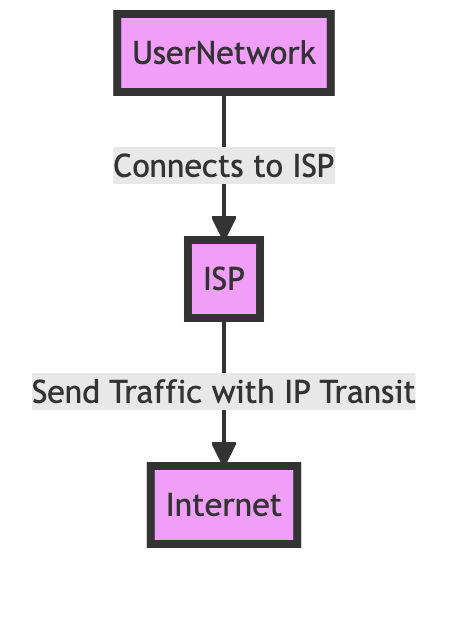
IP Transit is a service where a network provider routes your internet traffic to all destinations on the global internet using BGP. Think of it as hiring a global shipping company that knows every address in the world—instead of building your own delivery network to reach millions of destinations, you pay one provider to handle routing to everywhere.
But here’s what most people miss: IP Transit isn’t just about connectivity. It’s about access to the full BGP routing table—over 600,000 routes as of late 2024, with the number growing as IPv6 adoption accelerates and new networks come online—that enables your network to reach virtually any destination on the internet. Without it, your network is an island. With it, you’re part of the global internet infrastructure.
📘 How to Navigate This Guide: This comprehensive guide covers IP Transit from fundamentals to advanced considerations. We’ll explain what IP Transit is, how it works technically, how it differs from peering, why networks need it, what to look for in providers, and when it might not be the right choice. Each section builds on the previous one, so we recommend reading sequentially for the full picture.
What is IP Transit?
IP Transit is a service where a network provider routes your internet traffic to all destinations on the global internet using BGP. The technical foundation is Border Gateway Protocol (BGP), the routing protocol that makes the internet work. When you purchase IP Transit, you’re establishing BGP sessions between your network’s border routers and your transit provider’s routers. Your provider then announces your IP address blocks to the global routing table, making your network reachable from anywhere. And they send you the full routing table, so your routers know how to reach everyone else.
Here’s what you need to make this work: an Autonomous System (AS) number that identifies your network, IP address blocks to announce (which InterLIR can help you obtain), and BGP-capable routers at your network edge. The transit provider handles the rest—maintaining connections to thousands of other networks, managing routing policies, and ensuring traffic flows efficiently.
Mini-Case: A regional ISP serving 5,000 customers needed to provide internet access. They purchased 1 Gbps IP Transit from a Tier 2 provider with a 99.9% uptime SLA. Result: The ISP can now route customer traffic to any global destination, achieving 99.95% actual uptime and supporting their entire customer base with reliable connectivity.
The business value? Predictable costs (typically $2-8 per Mbps per month depending on provider tier), global reach without building thousands of direct connections, and SLA guarantees that protect your operations. Most transit providers offer 99.9% uptime SLAs, latency guarantees under 50ms to major destinations, and packet loss under 0.1%.
How Does IP Transit Work?
IP Transit works by establishing BGP sessions between your network and the transit provider, who announces your IP addresses to the global routing table. The process starts when your network engineer configures BGP on your border routers, specifying the transit provider’s router IP addresses as BGP neighbors.
Here’s the sequence: First, your router opens a TCP connection to the transit provider’s router on port 179 (the BGP port). Once the TCP session is established, BGP begins exchanging routing information. The transit provider sends you their full routing table—all 600,000+ routes as of late 2024, with IPv4 and IPv6 routes continuing to grow—which can take 5-15 minutes to fully converge depending on your router’s processing power and memory. Modern routers with sufficient resources (8GB+ RAM, multi-core processors) can converge faster, but the routing table size continues to increase as the internet expands.
✨ Expert Insight: Route filtering is where many networks stumble. Your transit provider will filter which routes they accept from you (to prevent you from announcing routes you don’t own), and you should filter which routes you accept from them (to prevent routing hijacks and optimize traffic flow). This is where technical expertise matters—poor filtering can lead to security issues or suboptimal routing.
Meanwhile, you’re announcing your IP address blocks to the transit provider. They accept your routes (assuming they pass their filtering policies) and propagate them to their upstream providers and peers. Within minutes, your network becomes reachable from anywhere on the internet.
Mini-Case: A data center needed to connect 100 servers to the internet. They established a BGP session with a transit provider and announced a /24 IP block (256 addresses). Result: All 100 servers can now reach any internet destination with an average latency of 28ms, and the data center can scale to additional servers by simply adding more IP addresses to their announcements.
The technical requirements are straightforward but non-negotiable: You need an AS number (obtained from your Regional Internet Registry through services like InterLIR’s LIR offerings), IP address blocks (which InterLIR specializes in providing), and routers capable of running BGP and handling the full routing table. Most modern enterprise routers can handle this, but you’ll want at least 4GB of RAM for the routing table and sufficient CPU to process route updates.
IP Transit vs Peering: What’s the Difference?
IP Transit provides access to the entire internet for a fee, while peering is a free exchange of traffic between networks of similar size. The fundamental difference is the relationship: with transit, you’re a customer paying a provider; with peering, you’re an equal partner exchanging traffic.
IP Transit vs Peering Comparison
| Feature |
IP Transit |
Peering |
| Cost |
$2-8 per Mbps/month |
Free (settlement-free) |
| Reach |
Entire internet |
Only peer networks |
| Relationship |
Customer-provider |
Peer-to-peer |
| Requirements |
Any network |
Similar traffic volumes (1-10 Gbps+) |
| Best For |
Small to medium networks, global reach |
Large networks, high-volume destinations |
Here’s the economic reality: Transit costs money—typically $2-8 per Mbps per month depending on provider tier and commitment level. Peering, when it’s settlement-free (which is most peering), costs nothing beyond the physical connection and colocation fees. But peering only gives you access to that specific peer’s network, not the entire internet.
Mini-Case: A gaming company with 10 Gbps of traffic needed global connectivity. They established peering at 5 major IXPs (handling 80% of traffic for free) and purchased 2 Gbps of transit for redundancy and unreachable destinations. Result: They save approximately $15,000 per month compared to using transit for all traffic, while maintaining full internet connectivity and redundancy.
The decision framework is simple: If you’re large enough and have the right traffic patterns, peering can dramatically reduce costs. If you’re smaller or have diverse traffic needs, transit is more practical. Most networks end up with a hybrid approach—peering where possible, transit for the rest.
Why Do Networks Need IP Transit?
Networks need IP Transit when they lack direct connections to all internet destinations, requiring a provider to route traffic globally. The math is brutal: There are over 60,000 autonomous systems on the internet. Building direct connections to all of them would require 60,000+ physical links, costing millions in infrastructure and ongoing maintenance.
- Internet Service Providers (ISPs) – Need transit to provide internet access to their customers
- Data Centers – Need it to connect their hosted services to the internet
- Cloud Providers – Use transit (or are transit providers themselves) to offer global connectivity
- Enterprises – With internet-facing applications need transit to reach their users worldwide
So here’s the practical reality: Unless you’re a massive network with extensive peering relationships, you can’t reach the entire internet without transit. A small ISP serving 5,000 customers would need to establish direct connections to over 60,000 networks to match transit coverage—an impossible task that would cost millions versus $500-2,000 per month for transit service.
Mini-Case: A SaaS startup launched with 1,000 users across 50 countries. They purchased 100 Mbps IP Transit with a 99.9% uptime SLA. Result: Their global user base can access the service with average latency under 100ms, and they achieved 99.95% actual uptime—exceeding their SLA and supporting business growth.
But it’s not just about reach—it’s about redundancy and reliability. Most transit providers offer multiple redundant paths, diverse routing, and failover capabilities. If one path fails, traffic automatically reroutes. This level of redundancy is nearly impossible to achieve with direct connections alone, especially for smaller networks.
Partner with InterLIR
to secure the IPv4 resources your network demands for IP Transit services. Our specialists provide tailored guidance on network architecture, strategic subnetting approaches, and comprehensive IP address lifecycle management—transforming technical complexity into competitive advantage.
What to Look for in an IP Transit Provider?
Key factors include network reach, redundancy, SLA guarantees, pricing structure, and technical support quality. But here’s what separates good providers from great ones: the ability to actually deliver on their promises when things go wrong.
Tier 1 vs Tier 2 vs Tier 3 Provider Comparison
| Feature |
Tier 1 |
Tier 2 |
Tier 3 |
| Reach |
Entire internet (no transit purchases) |
Regional + extensive peering |
Local/regional |
| Uptime SLA |
99.99% |
99.9% |
99.5-99.9% |
| Latency |
<30ms to 95% of destinations |
<50ms to major destinations |
Variable, higher latency |
| Cost |
$6-10 per Mbps/month |
$3-6 per Mbps/month |
$1-4 per Mbps/month |
| Best For |
Mission-critical, global operations |
Most businesses, good balance |
Regional operations, cost-sensitive |
⚠️ Production Deployment Best Practice: Red flags to avoid: Providers with no SLA, providers that won’t give you references, providers with poor online reviews, providers that can’t explain their network topology, and providers that pressure you into long-term contracts without trial periods. Always verify actual performance before committing long-term.
Let’s start with network tier. Tier 1 providers can reach the entire internet without purchasing transit themselves—they peer with all other Tier 1 providers. This means optimal routing, lowest latency, and best performance. Tier 2 providers purchase transit from Tier 1 providers but also peer extensively, offering good performance at lower cost. Tier 3 providers are typically regional and purchase transit from Tier 2 providers.
Mini-Case: An e-commerce company needed 10 Gbps transit for global operations. They evaluated three providers: Tier 1 at $8/Mbps ($80k/month), Tier 2 at $4/Mbps ($40k/month), and Tier 3 at $2/Mbps ($20k/month). Result: They chose the Tier 2 provider—achieving 99.95% uptime, meeting all performance requirements, and saving $40k/month versus Tier 1 while getting better service than Tier 3.
Pricing models vary. Committed Information Rate (CIR) guarantees a minimum bandwidth but allows bursting higher. Burstable pricing charges based on 95th percentile usage. Flat rate charges a fixed amount regardless of usage. Choose based on your traffic patterns—steady traffic benefits from CIR, variable traffic from burstable.
The Counter-Argument: When IP Transit Might Not Be Right
IP Transit may be unnecessary for small networks that can use peering or for networks with sufficient direct connections. And honestly? For some use cases, transit is overkill. Let’s address the strongest valid criticism head-on.
The criticism is valid in these scenarios: If you’re a large content provider with extensive peering relationships (think Netflix, Google, or major CDNs), you might handle 95% of your traffic through free peering and only need transit for edge cases. A financial institution connecting to 10 specific trading partners might find direct private connections more secure and lower latency (5ms vs. 30ms) than transit. A private enterprise network that doesn’t need public internet access obviously doesn’t need transit. And as of late 2024, some edge computing deployments are using satellite or wireless backhaul that bypasses traditional transit entirely.
Mini-Case: A large content delivery network peers with 200+ networks at major IXPs worldwide, handling 95% of traffic through peering. They only use transit for the remaining 5% of destinations they can’t reach through peering, and for redundancy. Result: They save approximately $200,000 per month compared to using transit for all traffic, while maintaining full internet connectivity and actually improving latency for most users.
But here’s why transit still matters for the majority: Most networks aren’t large enough to qualify for extensive peering (most peering policies require 1-10 Gbps minimum traffic). Most networks need to reach destinations beyond their direct connections (the internet has 60,000+ autonomous systems, not just a few peers). Most networks benefit from the redundancy and reliability that transit provides (multiple paths, automatic failover). And most networks find transit more cost-effective than building extensive direct connection infrastructure (millions in capital costs vs. thousands per month in operational costs).
The hybrid approach is often best: Use peering where you can (it’s free and often lower latency), use direct connections for high-value, high-traffic relationships, and use transit for everything else. This gives you the cost benefits of peering, the performance benefits of direct connections, and the global reach of transit. But transit remains the foundation that makes the other options viable—without it, you can’t reach the destinations you can’t peer with or connect to directly.
Conclusion
IP Transit isn’t just a connectivity service—it’s the foundation that enables networks to participate in the global internet. Whether you’re an ISP connecting customers, a data center hosting services, or an enterprise with internet-facing applications, transit provides the global reach, redundancy, and reliability your operations require.
The technical requirements are clear: AS number, IP address blocks, and BGP-capable routers. The business value is quantifiable: predictable costs, SLA guarantees, and scalable connectivity. And the decision framework is straightforward: evaluate providers based on tier, redundancy, SLA performance, pricing, and support quality.
For networks just starting their connectivity journey, InterLIR can help you obtain the IP address blocks and AS number registration you need to establish IP Transit services. Our LIR services streamline the process of getting the foundational resources that make transit possible.
The internet’s growth shows no signs of slowing. As of late 2024, we’re seeing accelerated adoption of IPv6 (which requires transit providers to support dual-stack routing), increased demand for low-latency connectivity driven by real-time applications and edge computing, and growing emphasis on network security following high-profile BGP hijacking incidents. IP Transit remains essential infrastructure, but the requirements are evolving: providers must now support both IPv4 and IPv6, implement RPKI (Resource Public Key Infrastructure) for route security, and offer DDoS protection as standard features.